NETGEAR is aware of a growing number of phone and online scams. To learn how to stay safe click here.
Forum Discussion

Yousef
May 16, 2023Guide
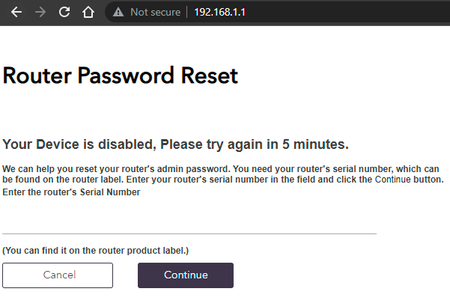
RAXE500 Your Device is disabled, Please try again in 5 minutes.
Hi, i have this issue but after reboot the router i can access normally, after 15 min its showing this message, the RAX200 not showing any issue at all, the problem from the new router itself. ...
- May 18, 2023
Glad you got it working. Please mark your thread as solved so others will know. Be sure to save off a back up configuration to file for safe keeping. Saves time if a reset is needed.
https://kb.netgear.com/24231/How-do-I-back-up-the-router-configuration-settings-on-my-Nighthawk-router
Enjoy. 📡


plemans
May 16, 2023Guru - Experienced User
Never seen that issue on mine.
When did it start?
What firmware are you on?
Does your password meet all the minimum requirements?

Yousef
May 16, 2023Guide
Never seen that issue on mine.
yeah but its happening to me
When did it start?
last 2 firmware
What firmware are you on?
last update available :
Firmware Version 1.0.12.96
Does your password meet all the minimum requirements?
yes its
- FURRYe38May 16, 2023Guru - Experienced User
What browser are you using?
Try a different browswer, MS Edge or Firefox or Opera.
Be sure to clear all browser caches and saved password profiles in the browser as well.
Has a factory reset and setup from scratch been performed since last FW update? A complete pull of the power adapters for a period of time after the factory reset then walk thru the setup wizard and setup from scratch with a wired PC and web browser. Recommend setting the default DHCP IP address pool range to the following after applying and a factory reset: 192.168.#.100 to 192.168.#.200.
https://kb.netgear.com/24089/How-do-I-specify-the-pool-of-IP-addresses-assigned-by-my-Nighthawk-routerWhat is the Mfr and model# of the Internet Service Providers modem/ONT the NG router is connected too?
I haven't seen this on mine either.
- YousefMay 16, 2023Guide
I tried all the requirement nothing works clear caches even i tried from the phone browser still showing the same message .
factory reset and doing all steps still showing same message.
ISP give fixed Modem cannot be changed and no idea about the details, but i was using RAX200 since 2020 and now i am using RAXE500 most likely from the FW, last 2 FW first release was login in normally.
maybe something need to be fix i search and i found i am not the only one who have this issue.
yes the password as requirement.
- plemansMay 17, 2023Guru - Experienced User
I hear you say you meet all the requirements.
But that's 10 characters
1 upper case
1 lower case
1 special character
1 number.
You've did all those when you setup the password?