NETGEAR is aware of a growing number of phone and online scams. To learn how to stay safe click here.
Forum Discussion

Yousef
May 16, 2023Guide
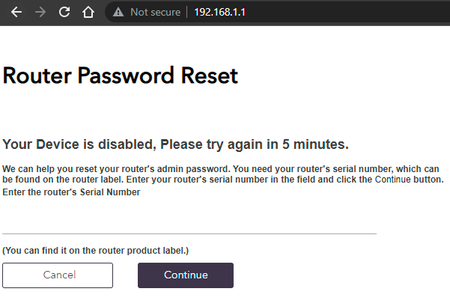
RAXE500 Your Device is disabled, Please try again in 5 minutes.
Hi, i have this issue but after reboot the router i can access normally, after 15 min its showing this message, the RAX200 not showing any issue at all, the problem from the new router itself. ...
- May 18, 2023
Glad you got it working. Please mark your thread as solved so others will know. Be sure to save off a back up configuration to file for safe keeping. Saves time if a reset is needed.
https://kb.netgear.com/24231/How-do-I-back-up-the-router-configuration-settings-on-my-Nighthawk-router
Enjoy. 📡

Yousef
May 17, 2023Guide
i have to RF for 5th time and doing your instruction, the problem is i am avoid to do FR due the smart home system in my house i have RTI i need to add the ports etc any how is seems the bugs here only password with Special characters, required an updated for that, now all fine i will keep check all day and update if there is an issue with the login password or showing the same message, thanks a lot !

FURRYe38
May 18, 2023Guru - Experienced User
Glad you got it working. Please mark your thread as solved so others will know. Be sure to save off a back up configuration to file for safe keeping. Saves time if a reset is needed.
https://kb.netgear.com/24231/How-do-I-back-up-the-router-configuration-settings-on-my-Nighthawk-router
Enjoy. 📡