NETGEAR is aware of a growing number of phone and online scams. To learn how to stay safe click here.
Forum Discussion

jguerdat
Nov 01, 2024Guru
Issue with OpenVPN on RAXE300
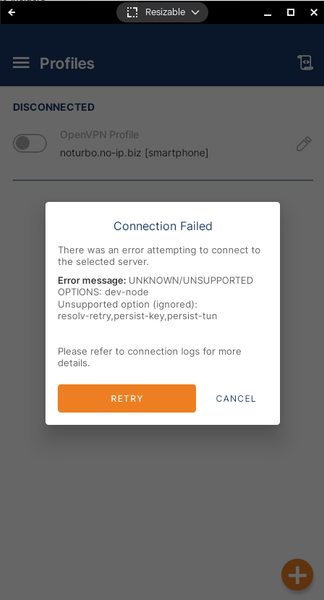
I recently had been getting ignorable errors when connecting via OpenVPN to my RAXE300 router but apparently a recent Android app update now has broken it completely. I tried downloading the .opvn se...

Kitsap
Nov 01, 2024Master
The most recent updates to the Android OpenVPN application added a number of custom setting options. If you do not review and set what you want, they take on the default setting that does not match what Netgear uses. Also review the advanced section at the very bottom of the settings screen.
jguerdat
Nov 01, 2024Guru
Thanks for that. A question is how do I know what options to change and where they are? Not a VPN or network expert...
Edit: I do see that I could edit the .opvn file and eliminate the "dev-node" line (is there a way to comment-out the line?) - is that a Good Thing to do?
- KitsapNov 01, 2024Master
jguerdat wrote:Thanks for that. A question is how do I know what options to change and where they are? Not a VPN or network expert...
Edit: I do see that I could edit the .opvn file and eliminate the "dev-node" line (is there a way to comment-out the line?) - is that a Good Thing to do?
The options you change are in the settings section of the mobile application. One page under settings and one page under advanced settings.
You may be into some trial and error, one setting at a time.
You can edit the ovpn file using a text editor. Once edited, you have to import it back into the mobile application.
For information on a specific line or command, use your web search.
The application for use on a Windows computer, generates a log file that highlights the errors.
- jguerdatNov 02, 2024Guru
I removed the one line (dev-node) which eliminated the fatal error but now I simply continue to try to connect forever until timeout. The router external address and port is correct in both the app and router VPN settings. I tried changing the VPN Protocol setting to UDP rather than Adaptive since UDP is the protocol used by the router. I also tried changing Advanced settings from Legacy to Preferred with instant failure (key is too short).
It would seem that a new .opvn file should be generated to match with updates to OpenVPN updates. Not sure where to go from here since there doesn't seem to be anything I can change.
Edit: Windows won't connect either.
- KitsapNov 02, 2024Master
For reference, make sure you are testing from an internet connection outside of your LAN. If you are on a smart phone, turn off Wi-Fi and connect through your cell data. A test connection from a computer has to be Wi-Fi or Ethernet from another location away from your LAN.
Generation of the ovpn configuration file from within the user interface is dependent on the installed firmware. Netgear is extremely lax when it comes to updating and keeping their firmware up to date in this area.
I successfully connected to a Netgear router through their OpenVPN server for years from both Windows and Android. The Netgear firmware fell in a ditch a couple of years ago in response to some Windows changes. Since that time I have retired my Netgear router and now use an ASUS product.
Do some searches here in the community for OVPN. Search in both the AC router community as well as the AX router community. I recall some success stories where posters included copies of their configuration file.