NETGEAR is aware of a growing number of phone and online scams. To learn how to stay safe click here.
Forum Discussion

derekcannady
Dec 23, 2021Guide
RAX120 V2 Constant Random Reboots
The router reboots frequently sometimes every 30 minutes. I have noticed that the router reboots under heavy system load of +50% on the processor. The only way I have been able to drastically lesse...
- Jun 11, 2022Installed beta firmware 1.2.3.33 on it and then turn fan on in debug.htm. Just check mark it , don’t click on apply.
And bought a cool pad from amazon $10 . 4 days in a row no restart and router works perfect.
Laptop Cooling Pad,ESGAMING Laptop Cooling Stand Laptop Cooler 10-15.6 Inch 2 USB Ports 2 Fans with Blue LEDs https://a.co/d/dXVVnxw
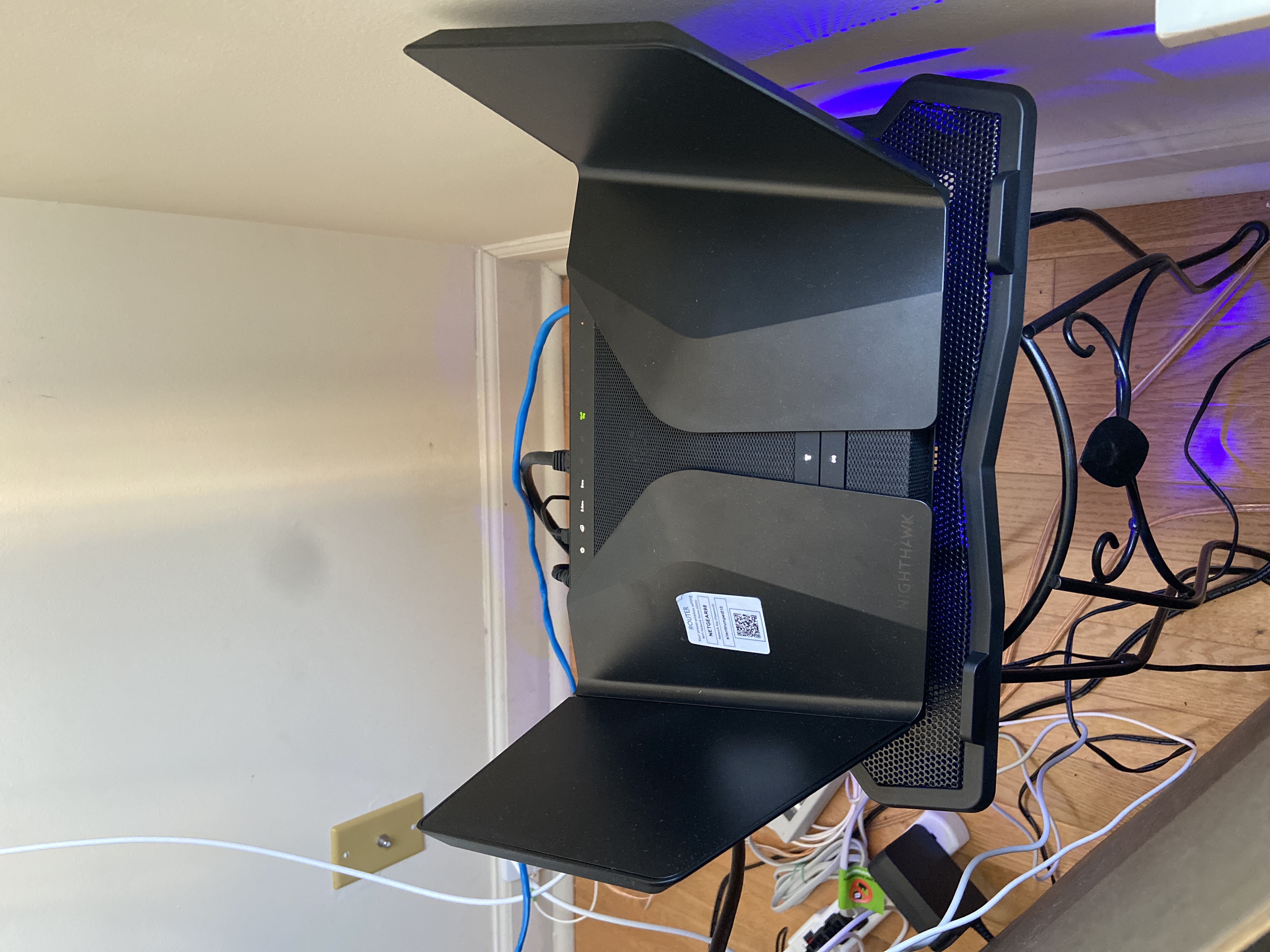

FURRYe38
Jun 28, 2022Guru - Experienced User
I would try testing with enabling the onboard fan and adding additional cooling under the router to see if the reboots stop for you. Others have already mentioned that this helps stave off the reboots.
If the router IS hot and is rebooting, the onboard fan is not being triggered ON thus would be one cause of the system rebooting.
The longer you wait on cooling, the more damage to the electronics on the board will become. Need to get cooling going ASAP. Heat over time will permanently damage electronics.
DannyLin wrote:
Guys, I have helped test and collect debug logs to NG for about a month.
Trust me. I don't think it's related to the heating issue.
There's no way to reproduce the reboot issue. Sometimes, it reboots within 2 days, sometimes every 1 or 2 weeks. Unless it has not been rebooted for more than 3 months, I wouldn't say it is resolved.
I have tried the latest firmware for debugging provided by NG, but it still reboots.
BTW, I have no additional fans installed on the top or bottom of the router. When the reboot happened earlier this month, the router was not hot. I wouldn't even say it is “warm”. But it still rebooted.
Honestly, I think it’s so silly to ask customers, especially paid a premium price longing for a matched performance, to help debug.
It’s hard to find the real reason until NG recalls all defective routers and replaces them with a newer model without issue.
DannyLin
Jun 28, 2022Apprentice
I think that's what many others did. And so did I, as instructed by NG folks, to help debug almost anything they thought might cause the reboot.
It still reboots. That's why I said I doubt it's related to the heating. And frankly, if it’s the heating that causes the reboot, then it's a product defect.
It still reboots. That's why I said I doubt it's related to the heating. And frankly, if it’s the heating that causes the reboot, then it's a product defect.
- FURRYe38Jun 28, 2022Guru - Experienced User
What kind of cooling did you add?
Others have already mentioned adding cooling to there's stopped the reboots.
Possible your not adding enough?
Possible the thermal heat pads on yours is defective.
What FW version are you using?
What's all connected to the router?
Did you try and disable 2.4Ghz WMM as some suggested?
What is the Mfr and model# of the Internet Service Providers modem/ONT the NG router is connected too?
DannyLin wrote:
I think that's what many others did. And so did I, as instructed by NG folks, to help debug almost anything they thought might cause the reboot.
It still reboots. That's why I said I doubt it's related to the heating. And frankly, if it’s the heating that causes the reboot, then it's a product defect. - dude8370Jun 28, 2022StarFor me, i added the AC infinity 140mm fan set to high. Here is photo of how it looks and is setup.
For me, it's running cooooool with it. Without, it warm-ish. I'm officially on the camp it's not a cooling issue. - FURRYe38Jun 29, 2022Guru - Experienced User
Just curious if yours reboots with out the additional cooling?
dude8370 wrote:
For me, i added the AC infinity 140mm fan set to high. Here is photo of how it looks and is setup.
For me, it's running cooooool with it. Without, it warm-ish. I'm officially on the camp it's not a cooling issue. - dude8370Jun 29, 2022Star
Yes, it reboots even with the extra cooling unfortunately .
- doctorcitoJun 29, 2022StarSame here Martin, spent months, many hours troubleshooting. Dropping from zoom calls daily, hurting my productivity at work! Could never watch a movie without multiple interruptions. They never stepped up to the plate and offered me a solution.Then at the end close my ticket due to inactivity. THEY DO NOT CARE! I've switched over to the Asus GT-AXE11000 and have had a stable network for over a month now. It's amazing when your router just works! My Netgear router is currently serving as a paperweight (it's really good at that). Finally, I can not believe that this post was marked as "solved" and the "solution" is a damn cooling pad. What a joke!
- DannyLinJun 29, 2022ApprenticeI’ve done everything that is discussed here.
Frankly, I’m not going to answer all these details.
Two years ago, I purchased the Asus router, which is quite unstable. Still, fortunately, their customer support was great, and their QA engineer was assigned to help investigate my case and help troubleshoot the issues that I encountered.
Unfortunately, the issue cannot be resolved. And luckily, they agree to exercise a full refund.
And then one of my friends recommended Netgear.
My experience with the Rax120v1 was great until it died about 15 months, and I got this problematic Rax120v2 through RMA. I thought it was a newer version, and I could enjoy a happier life with it. But damn, it’s not like what I have imagined. And then I have tried to help the NG team diagnose all possible issues So far, it’s still not resolved.
I have 3 versions of firmware provided by them, the latest one is V1.2.4.34-Internet-0601.
I don't think I'll spend more of my time on this. - tr4sh80Jun 29, 2022ApprenticeIt might just be Wifi6 growing pains. It is still a standard in it's infancy.
- nestorsameloJun 29, 2022Guide
Mine rebooted with cooling, with 140 mm fan blowing air down from top or blowing air up from bottom. I have fan always on, a configuration that turns off after a reboot. I also have WMM for 2.4 GHz disabled.
I installed the beta firmware 1.2.3.29-normal.
Despite all of this, if I start streaming from one device to another over wireless, Tablo DVR to TV or phone, 720p, it reboots in under 10 minutes.
- FURRYe38Jun 29, 2022Guru - Experienced User
NG IS AWARE of this problem and is NOT avoiding anything about it. Just because it's been 6 months since this was first and FW hasn't fixed it yet, doesn't mean NG has swept it under the rug.
If your not happy with your router, please contact NG support and ask about an RMA.
- FURRYe38Jun 29, 2022Guru - Experienced User
I wouldn't say infancy, rather maybe young adult. AX has been around since 2019. Been a few years on it so far. Maybe need some more maturity, However I don't think this is the case with the v2. Just seems to be a HW and FW issue at this point as the v1 works.
- tr4sh80Jun 29, 2022ApprenticeMy other theory is faulty memory.
- FURRYe38Jun 29, 2022Guru - Experienced User
Feed back: NG feels that they found some Kernel panics happening that can cause more CPU usage and thus also increase the internal heat with in that seems to be causing the random reboots. Especially under stress or load. So this gives those who turned on the thermal fan or added additional cooling and stopped the reboots from happening the work around solution for this which has already been posted about.
The beta that's being offered is supposed to help with these Kernel panics and should stop the random reboots.
Regardless of FW, I recommend that any user place a laptop cooler under any router they have. Helps keep the router cooler 24/7 and helps with electronics longevity.
- _NDS_Jul 29, 2022Apprentice
Hello all
just wanted to let you know the results of my successful investugation into this topic.
Firstly, a disclaimer - I live in UK and the solution I am providing won't work for the USA directly, however it should help you to direct any action you would want to take with Netgear. The reason I decided to post is that I firmly believe that I have identified the root cause of the fault.I have the UK version of the router several times throughout the upgardes of the firmware and found that the UK model RAX120-100EUS has had its speed and connectivity issues through various versions of firmware but did not randomly reboot (I kept returning the routers due to instability.)
When the version 2 of the RAX120 hardware was announced, I decided to finally buy this model due to promised upgrades to the chipset including UL OFDMA. Plus the user reports on firmware instability have dramatically reduced. However, that version hardware never has made it to the UK market (version 1 is still on sale here). I therefore bought RAX120 v2 in the USA and imported it. As soon as it arrived, I installed and started using it. Fortunately, the power adapter it came with was compatible with UK 240V AC 60Hz electricity supply.
The model number on the box is RAX120-100NAS. Prior to using the router I have updated it to the latest production firmware V1.2.3.28 and made a factory reset.
The router rebooted while in use without any warning during the first 48 hours. And then continued to reboot randomly as per many threads and posts in this forum.
It came with this power adapter:
USA adapter, as supplied in the box
- _NDS_Jul 29, 2022Apprentice
I noticed that the UK version of RAX 120 was supplied with a different adapter model, though an equivalent one to the one I got from the USA does exist for the UK market.
This is the UK power brick
- _NDS_Jul 29, 2022Apprentice
As you can see it is quite substantial in size. I started wondering why has Netgear chosen to change the adapter model though they have a perfect equivalent to the one in the USA?
Here it is:
- _NDS_Jul 29, 2022Apprentice
Please note, all three adapters have the same output voltage, current and power (19V, 3.16A, 60W). I concluded, that the European arm of Netgear was aware of the potential instability of the RAX120 router with the adapter model AD2003200 and replaced that model with a different one for a reason.
So, with great difficulty (Netgear doesn't sell their power adapters directly) I sourced the correct UK/ EU supplied power adapter (model ADS-65MIA-19), powered the RAX120 V2 router with it and hey presto - it has been stable for exactly one week without a reboot.
The router is stable, does not restart, does not drop connections, the cooling fan comes on and switches off regularly - as it should.
Therefore, the root cause of the random reboots problem is not in the firmware, not in the poor cooling, but in the inadequate features of the AD2073F20 power adapter the RAX120 v2 model is supplied to the US customer base.
Ironically, Netgear themselves state in their help pages on their website that incorrect power adpater may cause their routers to 'misteriously reboot'. Information about power adapters on Netgear products.
However, up until now thet have not found the source of the random reboots problem with the RAX120 v2. 🤣
Solution: RAX120 v2 owners in the US nag Netgear for a replacement power adapter
- FURRYe38Jul 29, 2022Guru - Experienced User
I suppose this could be one possible solution. Though if all your adapters you've tried supplied same voltage and amps. I would have checked the voltage and amps with a test meter across all three adapters to check for any differences. Could have been a faulty or out of spec adapter. I believe the 120 I have came with the non AD2003 adapter. I'll have to check on this.
Though other have found that there maybe a cooling issue that the units are not cooling properly and thus users have found that either enabling the thermal fan on the router or adding extra cooling, i.e. laptop cooler under the router has stopped these random reboots and not a power adapter replacement. Also there is a beta FW available for RAX120v2 users as well that is supposed to help resolve these random reboots as well.
- _NDS_Jul 29, 2022Apprentice
The same Netgear help article that I linked says that router could be also overheating due to the incorrect power adapter being used. So knowledge is there it just not applied properly. My findings point out that the random reboots will not be sorted by firmware.
- FURRYe38Jul 29, 2022Guru - Experienced User
Though the KB article doesn't specify a heat issue due to incorrect power adapter being used. I presume the KB article summarized that the use of incorrect power adapters, other than what came INBOX, could cause damage or incorrect operation of the router.
Though still all 3 adapters you tested would need to be checked by a power meter or oscilloscope to see if there are any differences between them that may cause something to happen.
Here is my RAX120 PS:
- _NDS_Jul 31, 2022Apprentice
Yes indeed, the adapter included in the box is the one you showed AD7023F20 (I used stock picture in my first post and could not replace it later).
This power adapter - AD7023F20- is the one that's causing the random reboots, as it clearly doesn't meet the requirements of this particular router.
Are you going to relay this information to Netgear to
1) stop their work on the firmware for the reboot issue, which clearly is not going to help it
2) make them replace the power adapters for all their USA RAX120 V2 customers, who lodged numerous complains about the issue with no resolution?
I assume you have some connection to Netgear in the USA, considering the frequency and nature of your posts in this forum?
- _NDS_Jul 31, 2022Apprentice
Here is my RAX120 V2 log that shows that the router did not restart since last Saturday when powered with UK / EU / Asia adapter Model ADS-65MIA-19 with the current firmware installed.
- FURRYe38Jul 31, 2022Guru - Experienced User
Well this is the adapter that is working for my RAX120 though. Have Not seen any reboots here.
Only items I have seen is the internal temp does get hot and adding the thermal fan and cooling helps here.
Can you take a meter reading of the volts and amps with all the power adapters you have? Especially the amp at the tip of these power adapters...
IF your not in the USA, then we presume the UK versions of the power adapters should work. USA adapters are not ment for use outside of the USA and would probably present this problem if used in other countries.
- _NDS_Aug 01, 2022Apprentice
FURRYe38if you 'have not seen any reboots' you must be an outlier, as the community forums are full of user complaints about router randomly rebooting, replacing it with another unit does not change that behaviour and none of the fixes you mention work. These are all signs of the hardware having an issue in a typical user environment. We do not know anything about your environment, do we?. Have you had your mains treated in some way? Are you running it from a power conditioner or UPS? All this may or may not matter.
What I know is that changing the power adapter stops this router rebooting problem and therefore it is that part of the hardware that makes a difference. Instead of trying to diffuse the situation and blame everything but the power adapter, why would you not pass my information to Netgear and get their official reply? They could at least do some of the measurements you suggested or other to understand what triggers the reboots of RAX120 V2 with the AD7023F20 adapter model.
- FURRYe38Aug 01, 2022Guru - Experienced User
Can you take a meter reading of the volts and amps with all the power adapters you have? Especially the amp at the tip of these power adapters...
The community has also taken in that there is a heat issue as well and others HAVE posted that turning ON the thermal Fan or adding extra cooling HAS resolved this. Mains are not treated nor do I run my router off a UPS. I'm also in the US region as well. I also have two other routers with same model and voltage and amps adapters, R7960P and R8000 and have never seen this problem on these as well. I've had the R7960P for a long time as well. All 3 adapters show same volt and amps on the output.
Anything would be possible as we would not know of what goes on out side of the US region in regards to power. It's presumptive to assume that what doesn't work out side the US region would be the same with in it with out deeper review of all the adapters taking into consideration the differences between US and non US regional power configurations.
I'll pass this along and see if we get any feedback.
- TopologyAug 01, 2022Virtuoso
_NDS_ , your research into the RAX120 reboot problem is intriguing. Two comments to consider….
(1) “This power adapter - AD7023F20 - is the one that's causing the random reboots”
I used a RAX120 (V1) with the supplied AD2073F20 power adapter for over two years and never experienced the reboot problem. If the AD2073F20 power adapter is the root cause of the problem, then it should be producing reboots even with version 1 of the RAX120?
(2) “my RAX120 V2 log that shows that the router did not restart since last Saturday when powered with UK / EU / Asia adapter Model ADS-65MIA-19”
Based on other forum posts, it appears that the RAX120 exhibits the reboot problem when under heavy load. Thus, elapsed uptime by itself may not be a good indication of stability?