NETGEAR is aware of a growing number of phone and online scams. To learn how to stay safe click here.
Forum Discussion

Redtulips7
Mar 11, 2023Luminary
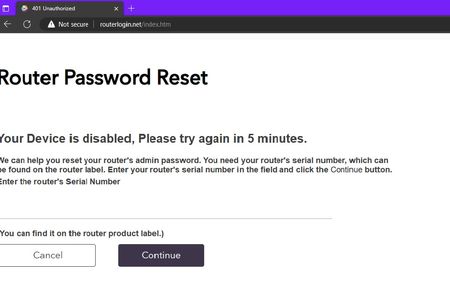
Router Password Reset>Your Device is disabled, Please try again in 5 minutes.
I am keep getting same warning about Router Password reset? Factort reset didn't help, I have tried .96 and .94 Firmware, same warning when I try to Log in. By the way This is new Router RAXE500
 Mar 27, 2023
Fix was uninstall Network Adapter from Device Manager(Desktop) as well as remove Driver package from Add/Remove Program then restart Computer then reinstall Network Driver. Make sure you Power Cycle Modem/ONT(Unplug for 5 Minutes) prior to install new Router, and don't put any special Characters in Router Log in Password.
Redtulips7
Mar 11, 2023Luminary
Also I didn't what FW Router came with but it update to .86 FW which I didn't have any issue!!! after manually update to latest FW .96 warning started to pop up.
Redtulips7
Mar 11, 2023Luminary
This fuc$$$ Router is going back to hell
- Redtulips7Mar 11, 2023Luminary
I went back to FW .86 where no issue at all
- Redtulips7Mar 11, 2023Luminary
So it seems like I am the only one facing this weird problem??????????
- michaelkenwardMar 12, 2023Guru - Experienced User
Maybe no one else understands the problem, what you are doing and where things go wrong.
Your details are a bit sketchy.
Among the many gaps in the information is the modem/gateway/ONT that sits in front of your router, where you see this error, and lots of other variables.
