NETGEAR is aware of a growing number of phone and online scams. To learn how to stay safe click here.
Forum Discussion

cyberwasp
Oct 03, 2021Star
Synology NAS Pihole
Is anyone out there running a Netgear Nighthawk rax50 connected to a synology disk station running Pihole. After replacing the first RAX50, This one lets me Change The DNS server to point to the NAS....

Razor512
Oct 03, 2021Prodigy
Sorry for the typos, the site lacks an edit button.
Beyond that, to be clear, a pi-hole will fail to block most modern ads, especially from recent months where many sites have been trying to circumvent DNS based ad blocking.
If possible look at the filters the pi-hole is using and then in your browser, attempt to load something from one of those domains that you have not visited before. Also check if it offers any logs on what it blocked
Beyond that, consider using ublock origin on your browser.
cyberwasp
Oct 03, 2021Star
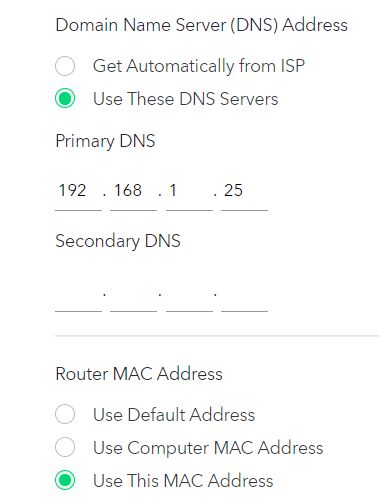
Razor512 Actually Pihole isn't my problem. It's getting the DNS Server setting to take hold. I put it in like the attachment shows and save it. However it didn't work. I think I stumble on it by mistake. You have to set the router MAC Adress to, "Use This MAC Address." something I never had to do with my other router. Is this correct and if not, why is it working!! And again, Thank you!!!!!!!!

- Razor512Oct 05, 2021Prodigy
That is quite strange, especially considering that it is a function largely for some cable modems and ONTs that have restrictions such as if you change a router without first releasing the DHCP lease, they will not assign a new IP if the MAC address has also changed.