NETGEAR is aware of a growing number of phone and online scams. To learn how to stay safe click here.
Forum Discussion

So_tired
Jul 24, 2025Guide
TCP SYN Flooding on RAX54v2 Router, Please help!
Hello all, i REALLY need help with stopping massive TCP SYN Floods to my home router. What has happened thus far: I got this router about 2 months ago ,(upgrading from a very old TP-link whic...
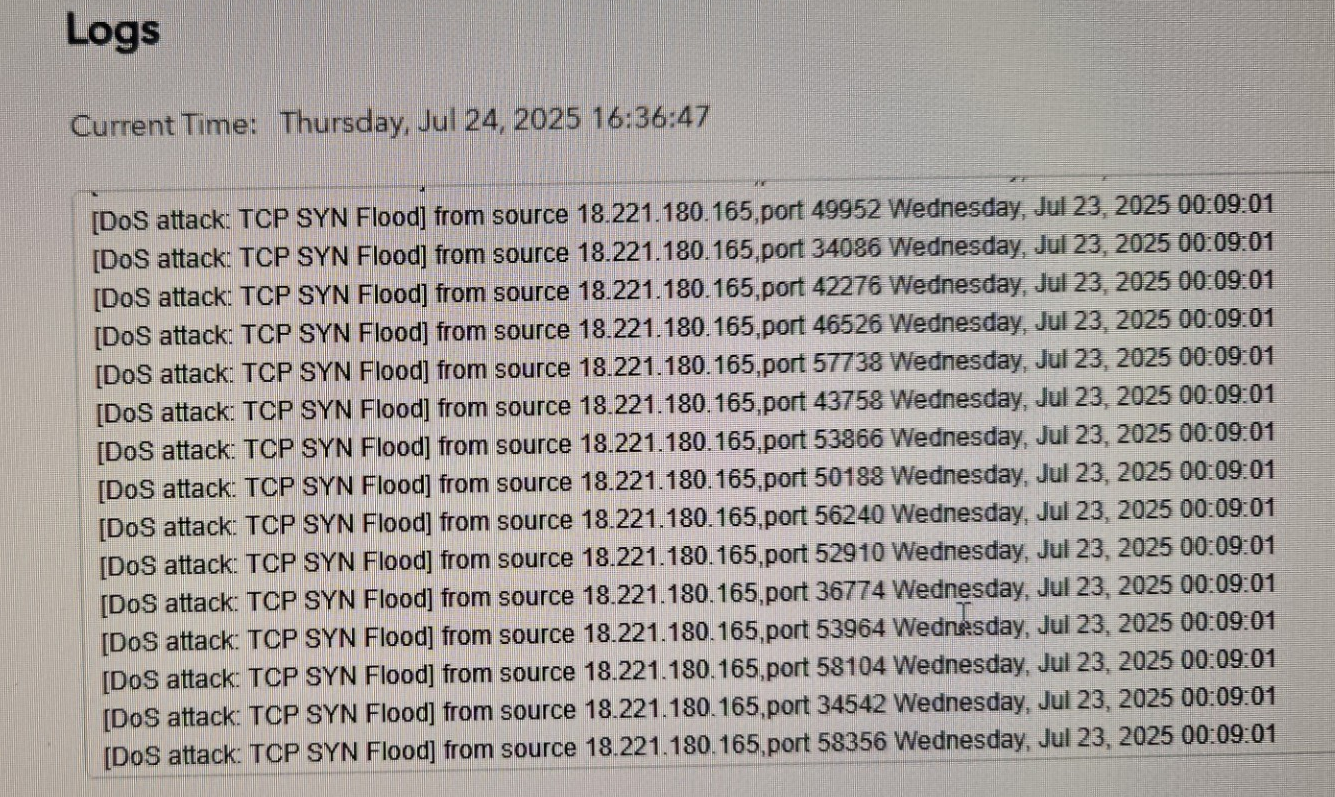
- Aug 06, 2025
OK so updated my RAX50v2 to recent FW version.
Factory reset and setup from scratch.CAX80 in modem mode.
PE is enabled by default. Testing with it enabled and disabled:
PE Enabled:
PE Disabled:
I Noticed that the testing site was being reported as flooding the logs:
[admin login] from source 192.168.1.2, Wednesday, Aug 06, 2025 15:39:37
[admin login] from source 192.168.1.2, Wednesday, Aug 06, 2025 15:39:33
[DoS attack: TCP SYN Flood] from source 4.79.142.206,port 45743 Wednesday, Aug 06, 2025 15:39:03After I logged in at 15:39 and disabled PE and re-tested again after that, logs didn't report any flooding from the test site.
I recommend that after you disable PE and re-test, have your ISP give you a new WAN IP address as I presume some nefarious items may have a target for that WAN IP address. Once you have PE disabled and a new WAN IP address, I'm hoping you shouldn't see issues continue.

FURRYe38
Aug 06, 2025Guru - Experienced User
What firmware version # is loaded on the router?
Do a Whois look up on the WAN side IP addresses to see where they are coming from.
Please post a copy and paste of the modems connection status page.
https://kb.netgear.com/30007/How-do-I-obtain-the-cable-connection-information-from-a-NETGEAR-cable-modem-modem-router
Any Criticals, Errors or Warnings seen in the event logs needs to be reviewed and resolved by the ISP. Indicates a signal issue on the ISP line up to the modem.
Is Armor installed on the PC and enabled on the Router?
Try disabling Armor all together on the router and PC then re-test again. All those post should be stealthed and not closed.
So_tired
Aug 06, 2025Guide
v1.1.6.36 is the firmwear on router and I checked the Nighthawk app and the online router page for new, said I was up to date.
So I need to comtact my ISP about these logs in my Modem? What should I say?
Armor is not installed on anything, its just activated through the Armor app on my phone.
How do i turn it off in my router?
If its not installed on my pc and only in app, can it still make all my ports not stealthed?
Can an ISP stealth your ports for you?
The no-stealth is probably why I am getting so flooded.
- FURRYe38Aug 06, 2025Guru - Experienced User
Ok just checking FW versions to be sure.
Have them check the event logs for those criticals and warnings.
Can you post the cable connection log page from the modem as well?
Yes Armor and PE can interfer with port results in testing. Use the NH app and go into the top left menu setting then down to Security. Select Armor and the slider button to disable it. After it's disable, power cycle the router OFF then back ON. Test SheildsUp again.
I'll put my RAX50v2 online today and test as well since it has same FW and PE feature. The results I posted below are from my RS600 with PE disabled. No Armor active.
- So_tiredAug 06, 2025Guide
Ok, so Armor and Protection Engin can interfere with STEALTHing ports, i understand now, why do they?
So i need to:
Turn off Protection Engine
Turn off Armor in Nighthawk App.
Turn off WiFi radio on both wifi channels.
Take any connected devices off router.
Try ShieldsUP! Again.
Cable connection log page?
The sight was un-clear on how. Wasn't that the page of logs I allready sent?
I will have to test this tommarrow and will let you know.
- FURRYe38Aug 06, 2025Guru - Experienced User
They change the port behavior seen by the test site.
Yes.
No. Cable connections page will have lots of numbers and channel listing for modem. Would like to see this full data page please.
- So_tiredAug 06, 2025Guide
Oh, I see you posted again, ill read that 1 src.