NETGEAR is aware of a growing number of phone and online scams. To learn how to stay safe click here.
Forum Discussion

Garry4
Jul 08, 2019Aspirant
Latest firmware breakd D6200 web GUI, how do I roll back using the Genie?
Hi, The latest firmware for the D6200 (V1.1.00.34_1.00.34) has broken the web GUI. I have tried Firefox, Chrome and Edge, all show a mostly text page. If I use the Genie to try and update (to roll b...
- Jul 12, 2019
Garry4 wrote:
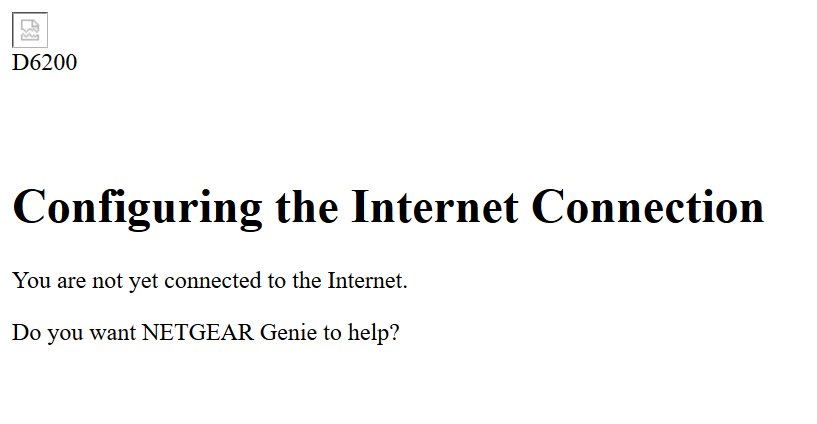
I am able to log into the router using the browser interface, but the home page displayed is simply dumb text, with the exception of the logout text which in fact does allow me to log back out again. All the other text seems to be text only. (I have not explored the HTML behind the page)
What does "simply dumb text" mean?
Screen (Alt + Print Screen) shot?
I assume that you tried routerlogin.net.
You could try the more severe recovery reset:
- Press reset for 30 seconds
- Keep pressing reset while removing power
- Keep pressing reset for another 30 seconds while apply power
This might dislodge any corrupt settings in the firmware.
There is another way of applying firmware:
How to upload firmware to a NETGEAR router using Windows TFTP | Answer | NETGEAR Support
In your case, unlike many of the people who need that, you start with the advantage that your D6200 is not bricked, with a flashing orange power LED.


schumaku
Jul 11, 2019Guru - Experienced User
Garry4 wrote:Is there a menu item that I have missed in either the Android Genie or the Windows Genie that allows a file update rather than the online update?
Neither of the two allow a file based individual firmware upload. Much more you have to use your router Web UI.
Garry4
Jul 11, 2019Aspirant
schumaku is correct. The release notes say;
> Log in to the router using a Web browser. The URL is http://www.routerlogin.net.
> Click ADVANCED tab > Administration > Firmware Upgrade
Sadly I have now effectivly "bricked" the router. I did a factory reset, and not only did it not fix the problem, but all the ADSL credentials are of course gone, and I can't enter them without the web GUI.
Sigh.
Any ideas?
Is there a url that triggers a firmware file upload?? such as something like 192.168.0.1/advanced/update, or is all generated on the fly?
Thanks.
- michaelkenwardJul 11, 2019Guru - Experienced User
Garry4 wrote:
Sadly I have now effectivly "bricked" the router. I did a factory reset, and not only did it not fix the problem, but all the ADSL credentials are of course gone, and I can't enter them without the web GUI.
"Bricked" is a term that refers to a device that simply will not work. The usual indicator is a flashing power LED. Is that what you see?
Hard to know what you mean by the web GUI. The browser interface?
The documentation explains how to do this.
And this:
If you cannot login to your router | Answer | NETGEAR Support
Garry4 wrote:
Is there a url that triggers a firmware file upload?? such as something like 192.168.0.1/advanced/update, or is all generated on the fly?
If you can get at that page in the interface you can either perform a manual upload as described in the release notes or you can invite the modem/router to do it automatically.
- Garry4Jul 12, 2019Aspirant
Hi,
> "Bricked" is a term that refers to a device that simply will not work. The usual indicator is a flashing power LED. Is that what you see?
Sorry, I have indeed played a bit loose with the term "bricked".
The router appears to be fully functional with the exception of the browser interface, this is where I use a browser and "point it" to, in my case 192.168.0.1. and log in.
(I have said "bricked" as esentially the router is unuseable, and apparently unrecoverable)
The Windows Genie, and Android Genie still connect and appear to be fully functional. They simply don't have the functionality I need to be able to configure the router.
> If you cannot login to your router | Answer | NETGEAR Support
I am able to log into the router using the browser interface, but the home page displayed is simply dumb text, with the exception of the logout text which in fact does allow me to log back out again. All the other text seems to be text only. (I have not explored the HTML behind the page)
> If you can get at that page in the interface ...
Sadly I only get a cut down, text only version of the homepage, with no active links enabling me to navigate to the firmware upload page.
So, in summary;
+ I can log in using the browser interface, but the web page displayed is text only without any means to navigate to other pages.
+ The Windows and Android Genies work ok, but they do not have enough functionality to configure the router.
+ The Windows Genie has the functionality to trigger a firmware update, but only from the web server, which of course says that the firmware is up to date so does nothing.
Many thanks,
Garry
- michaelkenwardJul 12, 2019Guru - Experienced User
Garry4 wrote:
I am able to log into the router using the browser interface, but the home page displayed is simply dumb text, with the exception of the logout text which in fact does allow me to log back out again. All the other text seems to be text only. (I have not explored the HTML behind the page)
What does "simply dumb text" mean?
Screen (Alt + Print Screen) shot?
I assume that you tried routerlogin.net.
You could try the more severe recovery reset:
- Press reset for 30 seconds
- Keep pressing reset while removing power
- Keep pressing reset for another 30 seconds while apply power
This might dislodge any corrupt settings in the firmware.
There is another way of applying firmware:
How to upload firmware to a NETGEAR router using Windows TFTP | Answer | NETGEAR Support
In your case, unlike many of the people who need that, you start with the advantage that your D6200 is not bricked, with a flashing orange power LED.