NETGEAR is aware of a growing number of phone and online scams. To learn how to stay safe click here.
Forum Discussion

glenintenn
Nov 25, 2020Aspirant
R7000 and Parental controls (*not* Circle) - is it just over with OpenDNS?
Greetings, Was gifted an R7000 router by a friend and am trying to set up Parental Controls. I don't have any interest in Circle (maybe watch the movie called THE Circle?). I downloaded Ge...
glenintenn
Nov 26, 2020Aspirant
I seem to be stuck in the NetGear Bermuda Triangle:
- netgear.opendns.com reports that I do not have a registered device available, use <desktop software> ( <-- Genie, correct?)
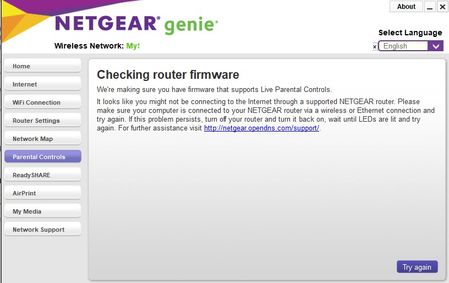
- Current version Genie reports router is not supported
- Mobile app does not support netgear.opendns.com
Is there a way out of this or are older router users shipwrecked and the joining The Circle is the only way out?
I did note that older posts in this community indicated that Genie worked with R7000s. Is it just a matter of getting an older version of Genie or ... is it that the combo of newer firmware and Genie just no longer work on an R7000 (and any other models which may not not made "the list")?

michaelkenward
Nov 26, 2020Guru - Experienced User
glenintenn wrote:
I seem to be stuck in the NetGear Bermuda Triangle:
- netgear.opendns.com reports that I do not have a registered device available, use <desktop software> ( <-- Genie, correct?)
- Current version Genie reports router is not supported
- Mobile app does not support netgear.opendns.com
You need to set up parental controls on the router before you can start using it.
Do this with the browser graphical user interface (GUI), not the genie.
Read the manual.
Visit the support pages:
Support | NETGEAR
and feed in your model number and check the documentation for your hardware.
The fact that your router is second hand may mean that it was already registered for parental controls.
glenintenn wrote:
I did note that older posts in this community indicated that Genie worked with R7000s. Is it just a matter of getting an older version of Genie or ...
That probably won't help either.
- glenintennNov 26, 2020Aspirant
The router web admin now just has a setting on the parental controls tab which allows you to slide a button to "on" for opendns. However, that does nothing that I can see...netgear.opendns.com still doesn't "see" the router as registered. What does turning on Opendns actually do? (the "learn more" button is just netgear.com/lpc which is a page describing the wonders of The Circle).
Its not the "already registered" error that others have reported in the past (see Genie screenshot above).
I was hoping someone had gotten an official "this is how you do enable opendns" from support --or-- that its formally desupported , speak to the hand, buy mobettah Circle for a low monthly car payment so we can sell your data more effectively- michaelkenwardNov 26, 2020Guru - Experienced User
Looks like Netgear is doing its best to shut down access to the old style Parental Controls. It keeps changing with new firmware "updates". It wants our money.
It is still there in the Netgear desktop genie. I can enable Parental Controls in there. I can then login to Opendns
https://netgear.opendns.com/sign_in.php
In there I can change things. But this is for an account I created quite some time ago.
- glenintennNov 26, 2020Aspirant
>>Looks like Netgear is doing its best to shut down access to the old style Parental Controls.<<
That would seem to be the case.
On the bright(er) side, Circle Premium is $49.99 per year for NetGear operators and the NetGear router operates as the Circle controller on your internal network. Hmm... I had breezed by that previously .
P.S. Does someone have to approve my images or something...they're all posting as a grayed out warning sign?