NETGEAR is aware of a growing number of phone and online scams. To learn how to stay safe click here.
Forum Discussion

supportinnorcal
Apr 16, 2020Aspirant
Netgear WIFI Adapter A7000 - Will Not Connect at Correct Local Connection Speeds
Recently purchased Netgear A7000 device is not connecting at advertised speeds or receiving data at advertised speeds even with a high-speed internet connection available. Other WIFI devices on the same network are achieving (200mbit down/40mbit up) without any issues. This particular deskop computer with the Netgear A7000 is in the same room as another laptop and the other laptop is achieving reasonable downloads and uploads for the cable internet connection (200mbit down/40mbit up). This is throughput from the internet.
In the Netgear Genie the reported connection speed is 867mbit as per the speed the device is connected to the Eero Pro router. However, download speeds via the internet connection often max out at (2mbit down/15mbit upload) or some variation where the download is significantly less than the upload and nearly unusable with the lag created. The connection speed number in the Genie software doesn't make sense given the internet speed tests that sometimes go as low as (0.5 mbit down). This is not the case on any other WIFI device in the house.
This issue remains the same regardless of driver version or what version of the Genie software I have installed.
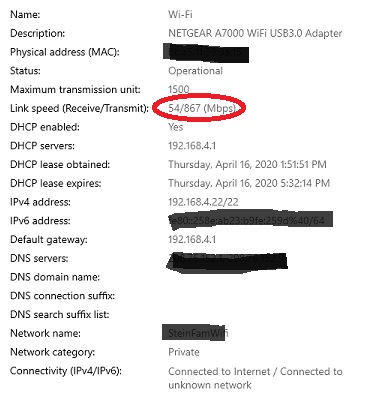
Here is a picture of the Network Properties window under Network Status in Windows 10: see attached
What I think is relevent is the information: Link Speed (Receive/Transmit): 54/867 (Mbps)
(I've included a picture below)
Devices:
Dell Windows 10 Pro Desktop (fresh Operating System install)
USB Netgear WIFI Adapter A7000
Eero Pro specs:
Tri-band WiFi radios, simultaneous 2.4GHz, 5.2GHz, and 5.8GHz wireless
2x2 MU-MIMO, beamforming,
IEEE 802.11a/b/g/n/ac
No RepliesBe the first to reply