Forum Discussion

RBLampert
Jul 21, 2022Aspirant
"Unusual" Runtime termination error message
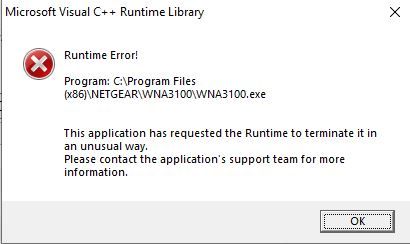
I've started getting the error message in the attached image when I start my computer. Everything seems to be working properly, though. I'm running 64 bit Windows 10. Is this something I need to be c...
- Jul 24, 2022
Fetch the "latest" drivers from WNA3100 Software Version 2.2.0.4 (Supports Win8/8.1), uninstall the existing WNA3100 adapter software and application from your system as advised, remove the USB adapter, and restart the system. Install just the standalone driver kit. Plug the WNA3100 USB adapter. Wait until the adapter is recognized. Use the standard Windows way for configuring a wireless network. No fancy utilities required to be run.

schumaku
Jul 24, 2022Guru - Experienced User
Fetch the "latest" drivers from WNA3100 Software Version 2.2.0.4 (Supports Win8/8.1), uninstall the existing WNA3100 adapter software and application from your system as advised, remove the USB adapter, and restart the system. Install just the standalone driver kit. Plug the WNA3100 USB adapter. Wait until the adapter is recognized. Use the standard Windows way for configuring a wireless network. No fancy utilities required to be run.
- RBLampertJul 24, 2022Aspirant
Done. Thanks. We'll see if that made a difference, since I was already running version 2.2.0.4.