NETGEAR is aware of a growing number of phone and online scams. To learn how to stay safe click here.
Forum Discussion

shutupandshave
Aug 08, 2019Follower
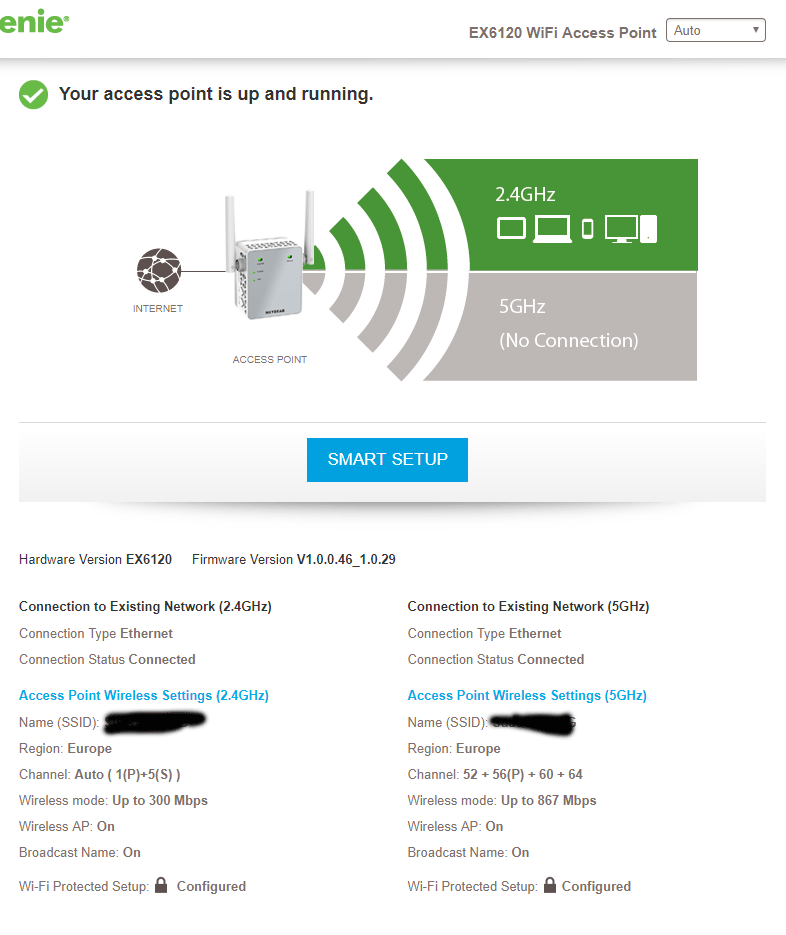
EX6120 not working with 5ghz in access point mode
My EX6120 not working with 5ghz in access point mode. It has a network cable in it, so I'm a little confused. The 2.4ghz is working, but the 5ghz says "not connected.
It's done this before and I keep doing the smart setup and it seems to eventually work but now it seems the 2ghz is not always connecting after doing the smart setup.
I can see the 5ghz SSID from my laptop but it has zero bars. The laptop is right next to the access point.
Anyone have any ideas?
1 Reply
 DarrenMSr. NETGEAR Moderator
You may need to set up the extender again by moving it beside the router factory reset the extender go through setup then move the extender back to where you had it see if it will connect.
DarrenM