NETGEAR is aware of a growing number of phone and online scams. To learn how to stay safe click here.
Forum Discussion

93fd3s
May 01, 2019Guide
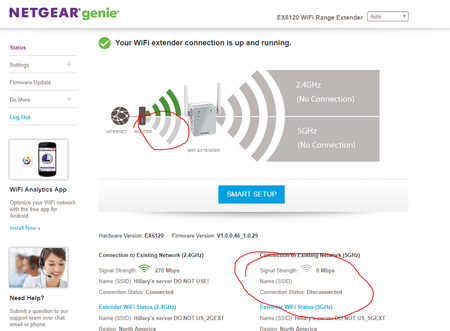
EX6120 RANGE EXTENDER NOT CONNECTING TO router ON 5g RADIO(S)
Just bought a new EX6120 and have tried setting it up several times, including a firmware upgrade. While the device seems to work, I am troiubled by the fact that it does not seem to be connecting t...
93fd3s
May 01, 2019Guide
Sorry - one more detail, the range EXT firmware is V1.0.0.46_1.0.29 I upgraded it when suggested during the initial installation though it seemed like it crapped out during the install I wonder if I could have a partially updated firmware?

plemans
May 01, 2019Guru - Experienced User
do you have your R8500 with smart connect running? Try disabling smart connect to setup the extender.
- 93fd3sMay 01, 2019Guide
I do actually have the Smart Connect feature enabled and I wondered if that might throw it off.
However, I managed to get the extender working on 5GHz. I reapplied my firmware update and that may have ahad an effect, but the last thing I did before the 5GHz connected was to change Fast Connect from Basic to Fast Connect with the 5GHZ band used between the router and the extender. Once I restarted in that configuration and verified that 5GHz was functioning between extender and router, I went back into the Fast Connect menu and set it back to "basic" and rebooted again. When the extender came back up, it was connecting to the router on both band (2.4GHz and 5GHz).
- 93fd3sMay 02, 2019Guide
Plemans,
While I have gotten things to work through my own methods, thank you for taking the time to read and respond to my post!