NETGEAR is aware of a growing number of phone and online scams. To learn how to stay safe click here.
Forum Discussion

Chongmc
Jul 16, 2019Aspirant
EX6200 AC1200 WiFi Access Point - Having problem with 2.4G band
Hi. I'm having problem on 2.4G band with my EX6200/AC1200 Dual Band Wifi Extender. I connect it with a ethenet cable, so it act as a access point now. When I speed test while connecting 2.4G, it ...
Chongmc
Jul 17, 2019Aspirant
Yes, I have no issue with Asus 2.4G and yes, we are using same SSID.
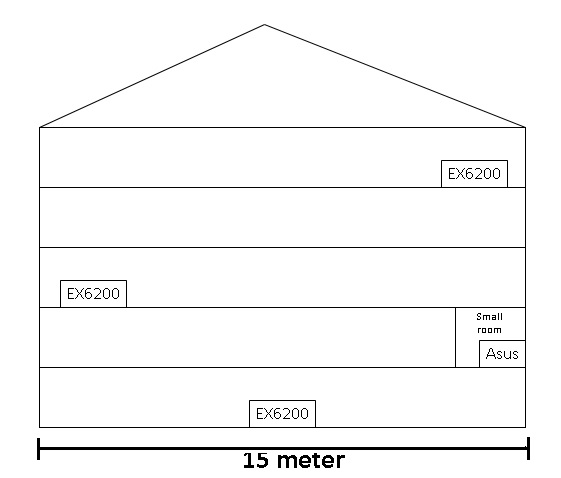
There 5 floors in my building here. I having a EX6200 at ground floor 2nd floor and 4th floor. I attached a picture for better understanding.
I'm using Ookla speed test on a phone and laptop aswell.
I get like 10+/-Mbps per second when I'm standing beside the extender. But if I stand slightly away like 7 meter away, the speed will drop to 1+/-Mbps.
And no, I haven't tried shutdown other EX6200 for testing purpose.
Any advise to how should this be setup? Such as I'm not suppose to use same SSID? Channel of 2.4G all must be different (channel 1 for first device, then channel 6 for second rounter. then 11 then back 1 etc)? Any advise?
Thanks.

plemans
Jul 18, 2019Guru - Experienced User
Since you have them in AP mode, its fine to have them on seperate channels.
I would seperate out the ssids though. The EX6200 doesn't have built in mesh or support seamless roaming.
You state over 5ghz speeds are fine. Are they fine if you hard wire into the extender? I get that basically makes it act as a switch but its another point of reference.
You can also try the shutting off all extenders but 1 and then shutting off the 2.4ghz on your main router. You can turn it back on but you're going to have to try different scenarios to figure out where the root cause is.
It'll probably take some testing aka playing around. Shut off all but one extender and focus on getting one extenders speed improved over 2.4ghz. If all 3 are having the same problem, it tends not to be the extender. It tends to be a setting you have in them, the router thats hosting, or the device you're testing with.