NETGEAR is aware of a growing number of phone and online scams. To learn how to stay safe click here.
Forum Discussion

rojoyinc
Jan 29, 2019Aspirant
EX8000 Mesh extender - shows nothing connected to wifi or lan!?
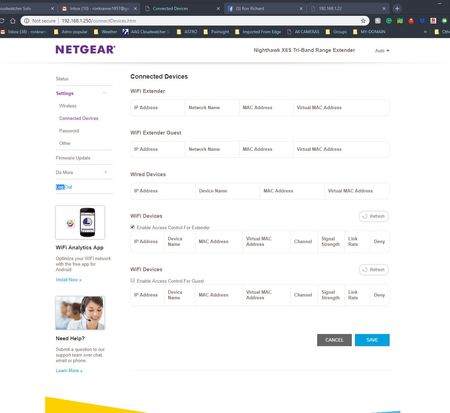
I have a nighthawk mesh extender in my observatory about 300 ft from my home with netgear router. It's been fine for nearly a year and lately has been dropping connections. Looking at the info page...

Christian_R
Feb 05, 2019NETGEAR Employee Retired
Hello royjoyinc - Please try another browser and device to see if the issue persists.
~Christian
rojoyinc
Feb 26, 2019Aspirant
I have tried IE, Firefox, and chrome. SAME (nothing listed) in all.
I see the EX8000 attached to my primary netgear router.
I don't see ANYTHING connected to the extender EX8000 (nothing listed).
I have a IP camera out near the EX8000 (it's no listed) but it is listed on my primary routers list (300 ft away).
If it's attached to the mesh EX8000 - Will it's IP still list on the R6300Vs router? Or does being listed only
on the primary attached devices list means it's signal is being connected through the primary only?
I have another device (hardwired, lan) to the EX8000 mesh unit and today it's not accessable at its normal IP address?
- rojoyincFeb 26, 2019Aspirant
PS - I have updated the firmware months ago (I believe it is still latest). and I have powered down and rebooted - with no change in connected devices listing?
- rojoyincFeb 26, 2019Aspirant
I checked (firmware IS up to date). I told it to reboot again - 2 minutes... upon rebooting the missing device is now working, but it's not listed.
I can not access it's IP as I usually can.
the mesh X6S is now showing ONE DEVICE on wifi. (there are more and a hardwired device not listed. The one device listed is on the MESH EXTENDER list AND on the primary router list. (I suspect that's is correct).?
The IP camera which is 5ft from the mesh unit - yet 300 ft from the primary router. But is going black every so often I think it's connected to the 300 ft away primary router? Is there a way I can force it to connect to the MESH router right next to it?- rojoyincMar 15, 2019Aspirant
Same persists. I now have 4 or 5 devices connected to the LAN. It showed none. I checked all 3 browsers (same). I refreshed and it showed the router itself connected to wifi?
I clicked "enable access control for extender" (sometimes doing that and saving work).nothing. So I rebooted (restarted) the mesh router from in the house. 2-3 minutes later after a reset. It lists ONE LAN connection of the 4-5 out there. ??? One device connected to lan isn't appearing or working. It sometimes works 24 hours later. I attached the screen capture AFTER the restart of the router. It shows ONE LAN connection out of the 4-5 that are connected and on.
It's really been doing this since I first started using it. But now I can't reach one of the devices. And rightly so - I can't find them on any lists and no IP.
