NETGEAR is aware of a growing number of phone and online scams. To learn how to stay safe click here.
Forum Discussion

ironmanco
Oct 07, 2018Tutor
EX8000 or similar mesh extender w/wired backhaul and single SSID
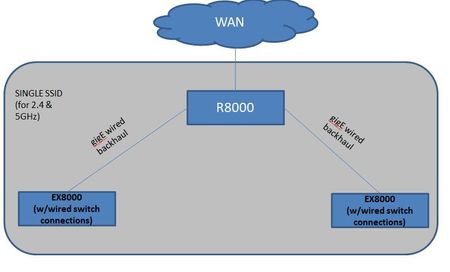
I have an R8000 and would like to set up mesh extension with multiple extenders (see below) with wired backhaul.
Questions:
1) Can the R8000 be part of the mesh network also providing wif...
ironmanco
Oct 08, 2018Tutor
It's not the router that is in question but if a wired backhaul can be used and maintain mesh with both the extender (EX8000) AND the router handing off wireless devices to each other.

StephenB
Oct 08, 2018Guru - Experienced User
It would be nice if Netgear had a KB article that did a deeper dive in how this all works in their mesh products.
It depends on what you mean by "maintaining mesh".
802.11k was originally designed for wired APs and it doesn't really do a "handoff". The normal steps are
- An AP determines that client is moving away from it.
- The AP informs client to prepare to switch to a new access point.
- The client requests list of nearby access points (site report)
- The AP responds with the site report
- The client can then switch to best AP based on the report
The list of nearby access points can only include the bssids that are within range of the AP. It "sort of" works if only some of the APs support 802.11k, since the fallback in the clients is to switch to the strongest signal that they see.
The other piece is 802.11r, which is basically speeds up the re-authentication with the new AP.
All this should certainly work in AP mode, though it would be nice if DexterJB would confirm (or correct).