NETGEAR is aware of a growing number of phone and online scams. To learn how to stay safe click here.
Forum Discussion

Rome0311
Jan 21, 2021Tutor
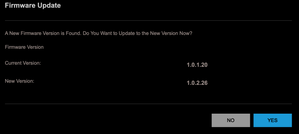
Firmware Update for AX1800 WiFi Mesh Extender to version 1.0.2.26 from 1.0.1.20
Friends, I got this message from my AX1800 WiFi Mesh Extender: Then I get the below message after clicking Yes. Any ideas why? For completene...
Rome0311
Jan 21, 2021Tutor
So I plug an ethernet cable from from the EAX15 to a computer and then do what?
Am I supposed to plug my computer into the switch to avoid using WiFI (we are assuming that is the problem)? I would still think I need to connect to the IP address of the EAX15 (over ethernet) and go through the UI/X prompts as that is the only place the firware file exists as we discussed above.
What am I missing?

plemans
Jan 21, 2021Guru - Experienced User
I'm just trying to get you to try the update via a hardwired connection.
If it doesn't, then you'd just ned to wait for the file to be uploaded to the manual server.
- Rome0311Jan 22, 2021Tutor
If I understand what you are suggesting I do not think it's possible. But, I may not really understand your suggestion.
What I understand is I plug my laptop into my extender (do something) and I'm done. I think I am asking for clarity on the 'do something part.'
My best guess is I borrow my compers internet connection and have the computer DHCP an IP address to the Enxtender (I know of no other way to communicte with it) and then from the extender I then connect to via IP to to the laptop to get to the internet to download the firmeware file.
If that is right, then that process is complicated enough to make sure I get the procedure right so as not to waste time.
Is this what you are proposing?