NETGEAR is aware of a growing number of phone and online scams. To learn how to stay safe click here.
Forum Discussion

Rugae
Apr 27, 2020Aspirant
Need help connecting to 5GHz on the EX7500 Wifi Extender
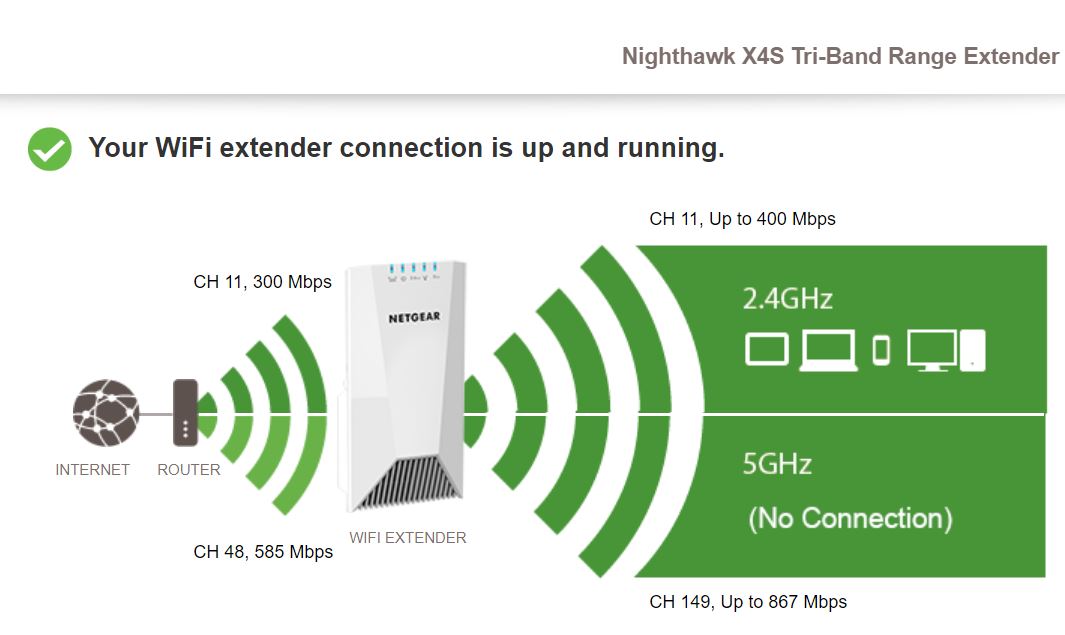
Hello, I have a problem connecting to the 5 GHz with the EX7500 Wifi Extender. On mywifiext, it indicates that the extender is connected to my router. My router is Netgear RAX40. However, under 5 GH...

plemans
May 06, 2020Guru - Experienced User
I have a feeling that either you're to far away from the router, to much stuff in the way, or the router isn't dual band.
Reason why is the 2.4ghz is running for the backhaul when it should be using on of the 5ghz channels. It only defaults back to that if there's an issue connecting back to the routers 5ghz.
And the connection back is only the 173mbps for the 2.4ghz. So its not even connected at full speed there.
2.4ghz can penetrate objects better and can broadcast further so if its not at full speed, the 5ghz definietly wouldn't be.
Rugae
May 06, 2020Aspirant
Thank you for your response.
The thing is the extender is currently in the same room as the router and is about 10 steps apart. The reason I’m doing that because I’m running into all these troubles and I want to eliminate distance as a factor :(. Do you think this has something to do with the channels they’re connecting to? Router is connected to channel 7 for 2.4Ghz and channel 118 for 5GHz. Extender is defaulted at “Auto” for 2.4 GHz (can’t change to anything else) and channel 149 for 5GHz
The thing is the extender is currently in the same room as the router and is about 10 steps apart. The reason I’m doing that because I’m running into all these troubles and I want to eliminate distance as a factor :(. Do you think this has something to do with the channels they’re connecting to? Router is connected to channel 7 for 2.4Ghz and channel 118 for 5GHz. Extender is defaulted at “Auto” for 2.4 GHz (can’t change to anything else) and channel 149 for 5GHz
- plemansMay 06, 2020Guru - Experienced User
Rugae wrote:
Thank you for your response.
The thing is the extender is currently in the same room as the router and is about 10 steps apart. The reason I’m doing that because I’m running into all these troubles and I want to eliminate distance as a factor :(. Do you think this has something to do with the channels they’re connecting to? Router is connected to channel 7 for 2.4Ghz and channel 118 for 5GHz. Extender is defaulted at “Auto” for 2.4 GHz (can’t change to anything else) and channel 149 for 5GHzthe extender backhaul functions off the routers 5ghz.
Try changing your routers channel to a lower channel range (36-48) and not the DFS channels.
Then reboot the router and extender and see if the 5ghz willl connect.
If it doesn't, rerun setup on the extender. The whole purpose of the tri-bands is that 5ghz backhaul so speeds are faster because 2.4ghz is slow.