NETGEAR is aware of a growing number of phone and online scams. To learn how to stay safe click here.
Forum Discussion

rojoyinc
Jan 29, 2019Aspirant
EX8000 Mesh extender - shows nothing connected to wifi or lan!?
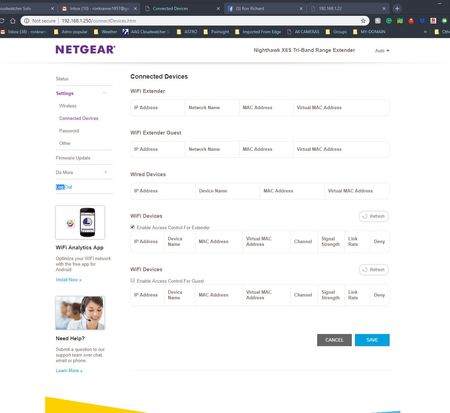
I have a nighthawk mesh extender in my observatory about 300 ft from my home with netgear router. It's been fine for nearly a year and lately has been dropping connections. Looking at the info page...
rojoyinc
Mar 15, 2019Aspirant
Same persists. I now have 4 or 5 devices connected to the LAN. It showed none. I checked all 3 browsers (same). I refreshed and it showed the router itself connected to wifi?
I clicked "enable access control for extender" (sometimes doing that and saving work).
nothing. So I rebooted (restarted) the mesh router from in the house. 2-3 minutes later after a reset. It lists ONE LAN connection of the 4-5 out there. ??? One device connected to lan isn't appearing or working. It sometimes works 24 hours later. I attached the screen capture AFTER the restart of the router. It shows ONE LAN connection out of the 4-5 that are connected and on.
It's really been doing this since I first started using it. But now I can't reach one of the devices. And rightly so - I can't find them on any lists and no IP.

nhinkle
Mar 15, 2019Apprentice
I have the EX8000 on the current firmware as well and the "Connected Devices" screen output is not the best. First, when I first go in the screen, it shows nothing connected. This is true 100 percent of the time. The only way I get it to output anything is to hit the refresh button that is on the right hand side of the "Connected Devices" over the extender network. It behaves just like when you open the page with the circling please wait dialog and then it comes up with the connected devices (though not always correctly and sometimes with a device on the wired lan and the wifi which shouldn't happen - I am running in access point mode with a wired backhaul).
There was a period when I was getting no devices showing, and that was when I had two devices with a DNS name collision - nothing with an IP address above the higher IP address of the colliding names would show in device listings on any of my netgear devices and all my EX8000 devices were getting higher IPs. Have you added anything to your network lately, as in within close temporal proximity of when the EX8000 started acting up?
Doubt this helps, but I thought it worth a shot.
- rojoyincMar 18, 2019Aspirant
sometimes that works - RARELY like the msg said. Is this a warranty thing? If this is not normal... can I swap out the device? Who to contact about that?