NETGEAR is aware of a growing number of phone and online scams. To learn how to stay safe click here.
Forum Discussion

Jamie-NH
Apr 21, 2024Aspirant
Schema of a Smart Home: One IP => Multiple MACs
I use an XR700 router with a EX8000 extender. They were expensive and I hope that they would provide my household a few more years of service. I want to use TP-Link Smart Plugs (Kasa brand) becau...
Jamie-NH
Apr 23, 2024Aspirant
FURRYe38 wrote:Something you can try, Turn OFF the EX extender and let the devices all connect to the XR router. Setup some IP address reservations there for your devices you want to control and such. Once that's all setup and working, then power ON the EX extender. See if this configuration continues to work with the EX on.
I did this and it worked (for now, at least). I am very confused.
I would have expected that when the devices migrated back to the extender, the router would see their virtual MAC's and it did:
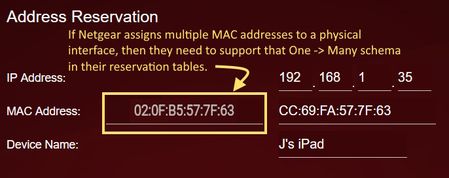
However, the router's DHCP service then broke its own reservation rules and provided the virtual MAC device with the IP reservation associated with the native MAC address. Wow! What is going on here?!? The router shouldn't recognize the device by virtual MAC, right?
Perhaps, the IP reservation was just being held by the devices and simply weren't yet relinquished. But I setup my DHCP reservations to expire in 1 hour for this testing situation and this stickiness has lasted over night.
Furthermore, I created a second reservation for the virtual MAC to set the device to a different IP address and kept the original (native MAC):
The router's DHCP still provided the 1.23 address associated with the native MAC.
So, I rebooted the plug (power off/on) - it connected through the extender with virtual MAC and still got native MAC reserved IP - good! Big test, unplugged device and rebooted router and extender then plugged in device after extender was up and STILL GOOD.
What is going on here, FURRYe38?
Can I count on this reservation to last? Is that why I see this entry in my client list (even after the reboot) with two MAC addresses associated with a single device, like this:
Thanks for your help.

schumaku
Apr 23, 2024Guru - Experienced User
Jamie-NH wrote:
FURRYe38 wrote:
Something you can try, Turn OFF the EX extender and let the devices all connect to the XR router. Setup some IP address reservations there for your devices you want to control and such. Once that's all setup and working, then power ON the EX extender. See if this configuration continues to work with the EX on.
However, the router's DHCP service then broke its own reservation rules and provided the virtual MAC device with the IP reservation associated with the native MAC address. Wow! What is going on here?!? The router shouldn't recognize the device by virtual MAC, right?
The router's DHCP still provided the 1.23 address associated with the native MAC.
Again, down to the basics. This magic XR700 is a Netgear device, enhanced with the NetDuma code for the gaming features.
The underlaying DHCP server is the very say like on any other Netgear consumer router, with the industry standard design of -one- MAC address and -one- IP address, and built (unless I'm very wrong) based on the ubiquitous and omnipresent Busybox udhcpd DHCP. To me, it looks like NetDuma (and/or Netgear) has added this not just misleading, but technically wrong idea for supporting a single IP address with two or more MAC addresses in their gaming router Web UI.
What you experience is nothing but the RFC compliant, industry standard behavior of the Busybox udhcpd DHCP. Which ever MAC is taking preference is likely mostly random, active in the HDCP processing is only -one- MAC and the -one- associated IP address.
Back to the sender, being to Netgear and/or NetDuma, to get their pants up, ideally to remove or disable this ability to define -one- IP address with two or more MAC - simply because the Busybox udhcpd can't and will likely -never- deal with. Because it does not have to. The router behavior is correct 8-)
Cumbersome this discussion is currently in the Wi-Fi Range Extenders 6 Nighthawk Mesh community section, where Netduma_Alex Netduma-Liam Netduma_Luke Netduma_Jack are not participating - as the problem the customer facing is caused by a wrong Web UI implementation on the Netgear Gaming routers.
- Jamie-NHApr 23, 2024Aspirant
Which ever MAC is taking preference is likely mostly random, active in the HDCP processing is only -one- MAC and the -one- associated IP address.We know that the MAC presented to the router is not random (the device advertises its actual MAC without an extender, otherwise the first 24 bits are replaced with 02:0F:B5 by the extender).
My test indicates that the IP reservation is not random, either. After the router first met might smart plug yesterday, without an extender in between, the router seems to know the device and remember it after rebooting and always feed it the IP associated with the real MAC (,even if the device is now only presented through the extender using a virtual MAC).
Another way to see this is when you click "Add" under IP reservations, you get a live list of routes and this is active:
192.168.1.23 XEspresso 02:0F:B5:C7:DF:AC I can operate the smart plug by IP address and ping it, so it is indeed x.x.1.23
As explained, I have the following IP reservation for this virtual MAC which is being ignored by dhcpd:
192.168.1.16 XEspresso 02:0F:B5:C7:DF:AC The router is exercising this reservation instead:
192.168.1.23 Espresso 9C:53:22:C7:DF:AC So is this really just the GUI presenting the wrong world to the user or is there some undocumented stickiness found in the IP reservation system?
In case this makes a difference, the above testing is with a extender model RBS40V (not my EX8000, which also overwrites the first 24 bits with 02:0F:B5).
My DHCP system does have another bug, where it occasionally dishes out IP's below the range set. This is probably not related, unless it is remembering a device from even before the range was set a year ago.
My one test is hardly conclusive, I understand. I will do more testing when my wife is sleeping and the network can be repeatedly bounced.
- schumakuApr 23, 2024Guru - Experienced UserThere is nothing overwritten. What you talk of are Locally Administered Addresses, these
can be identified by looking at the second hex character in the MAC Address. If the character is a 2, 6, a or e, the address is considered as locally administered.
This technology is used by various extenders - in this case it's MAC address translation as explained multiple times already, this design is not limited to Netgear. Similar addresses are used on wireless access points multiple SSIDs mapped to different VLANs.
Al these addresses are used on purpose, by design - nothing random: The extender does handle these correct. Just your idea on forcing the same IP on different MAC address is basically wrong. The DHCP server on the router (here your Gaming Router) - but any other industry standard DHCP server has the same limitations: By design and intention.
If you want to avoid these issues, deploy real wireless access points instead of this consumer extenders - capable WiFi mesh extenders (in full Mesh mode, not in extender mode) don't have these limitations, too.- Jamie-NHApr 24, 2024Aspirant
schumaku wrote:
There is nothing overwritten.I thought that MAC address translation required the loss of the first half of the MAC address when routed outside of the WiFi extender's SSID realm. Is the device's real MAC ever shared with the XR700 router by a WiFi extender?
schumaku wrote:
This technology is used by various extenders - in this case it's MAC address translation as explained multiple times already, this design is not limited to Netgear.I stated that other vendors do this in my first post. Doing something because others do it is never a reasonable excuse, though.
schumaku wrote:
Just your idea on forcing the same IP on different MAC address is basically wrong. The DHCP server on the router (here your Gaming Router) - but any other industry standard DHCP server has the same limitations: By design and intention.Lets be crystal clear and not muddy my proposal. My proposal is to allow for only a virtual MAC address and its real MAC address to both by identified for an IP reservation. If it is true that these two MAC addresses refer to the same physical interface, then how "wrong" is this really? What would it break?
My other question remains: Isn't netgear/dumaos already making this association on the XR700? We see the virtual and the real MAC's listed together under the same device under "Client Connections" and IP Reservations ARE WORKING even when a device is behind and extender and after multiple reboots of all 3 hardware components. How can this behavior be explained?