NETGEAR is aware of a growing number of phone and online scams. To learn how to stay safe click here.
Forum Discussion

paradoxcontrol
Jan 21, 2022Follower
Basic VLAN Help
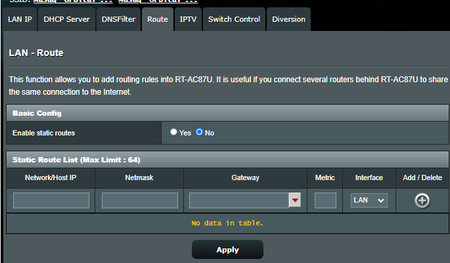
Hi, I have an Asus RT-AC87U router with Asuswrt-Merlin installed. I would like my server connect to the GS108Ev3 -> Router -> Internet. Plugged in with default settings, that works, but I would...


schumaku
Jan 22, 2022Guru - Experienced User
Guess michaelkenward already requested a moderator to move this thread Smart Plus And Smart Pro Managed Switches Forum already (not sure what added value the long reply should have there however).
paradoxcontrol wrote:
Plugged in with default settings, that works, but I would like the GS108Ev3 devices to be on a VNET, I can set that up on the switch,...
Of course, the switch can be configured say for one port with a VLAN trunk config (for example VLAN xx [U]ntagged PIVD xx; and VLAN yy [T]ntagged) for the uplink to the router, and configure select other ports as access ports (VLAN xx [U]ntagged PIVD xx; and VLAN yy [U]ntagged PIVD yy)
paradoxcontrol wrote:
...but I don't know what to put for eg default gateway or the switch IP, and then I don't know how to get my router to detect / see it if I change anything there
The switch IP config is just for the switch administration, nothing else. It's a pure configurable L2 switch. Typically you will configure an address in your primary LAN (say LAN 1), DNS and default gateway pointing to the LAN 1 router IP.
paradoxcontrol wrote:
If I wanted the devices behind the switch on say, 192.168.10.1, how do I see those devices from my PC or the switch? Could you tell me what settings to put where on the router?
Not sure why you want to do this. For two IP subnetworks, you need two networks (these could be VLANs of course), a router supporting multiple networks (IP subnets) on dedicated ports or ideally even VLANs, offer DHCP, offer routing between the networks, doing many2one NAT routing for two local networks (like LAN 1 and LAN 2). Not sure your router firmware does have these features.
paradoxcontrol wrote:
If I wanted the devices behind the switch on say, 192.168.10.1, how do I see those devices from my PC or the switch? Could you tell me what settings to put where on the router?
Not sure why you want to do this. If you want to access and see all the devices from your PC (probably from your mobile, too) without any restrictions, just rune one network.