NETGEAR is aware of a growing number of phone and online scams. To learn how to stay safe click here.
Forum Discussion

mphegge64
Aug 05, 2023Aspirant
Cannot update the firmware on AC6700 v2 - will not allow .img file
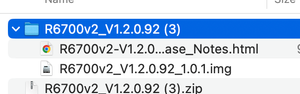
AC6700 v2 Nighthawk. First, router does not respond when try to connect via the iOS app. That is worthless. Download and try to use web interface but is doe not accept the .img file from Netg...

michaelkenward
Aug 05, 2023Guru - Experienced User
mphegge64 wrote:
AC6700 v2 Nighthawk.
First, router does not respond when try to connect via the iOS app. That is worthless.
Not sure what that means In what way "does not respond".
What is worthless? Your iOS device? Some of us might agree.
Best to avoid using iOS or Android apps to update the firmware – or so much else come to that.
This is more reliable
How do I manually upgrade firmware to my NETGEAR router? | Answer | NETGEAR Support
mphegge64
Aug 05, 2023Aspirant
iOS App does not connect to the device as it doe snot respond.
Read the post and look at the images.
The upload of the .img file from the web interface does not work as it rejects the file.
I have worked in IT for 25 years, its a pretty simple process. It is just not working as instructed
- michaelkenwardAug 05, 2023Guru - Experienced User
mphegge64 wrote:
Read the post and look at the images.
I did.
You did not say "does not connect to the device". You said "does not respond". Two very different things.
Before anyone can diagnose that they need to know which version of iOS and which version of the Nighthawk App.
Then they need to kn ow if your iOS device can connect to the wifi from the router. (You have to do that before you can connect to the router, a step that people sometimes miss.)
That your R6700V2 has an IP address of 10.0.0.1 raises questions about the rest of your network.
What modem site between the router and the Internet?
The default IP address for the R6700V2 is 192.168.1.1. Unless you deliberately set it at that for some reason, anything else can be a sign of potential conflicts.
It is just not working as instructedSee above. It only works "as instructed" if everything else is as expected and you are following the correct procedure. You haven't provided enough information for anyone to be able to troubleshoot what is happening.
- mphegge64Aug 05, 2023Aspirant
Listen, forget the iOS app, I was over that when I could not connect to the devices. The instructions, which I posted, do not work as shown in the screenshots I provided.
The router has an Admin interface. That is where I am attempting to update the firmware.
Administration > Router Update
It is rejecting the firmware .img file stating : Please assign the correct file. The file format is *.chk
The IP I assigned has nothing to do with this process. Networking 101 in setting up a private secure network is to change the factory defaults.
- michaelkenwardAug 05, 2023Guru - Experienced User
mphegge64 wrote:
Listen, forget the iOS app, I was over that when I could not connect to the devices. The instructions, which I posted, do not work as shown in the screenshots I provided.
You brought it up.
Your screenshot is useful. Unfortunately, it doesn't make sense.
The firmware installed on your router has nothing to do with the R6700V2.
There has never been firmware version 1.0.4.128 for the R6700V2.
On further investigation, that firmware is for the R6700V3. It is also the latest version. You do not need to update it.
R6700v3 Firmware Version 1.0.4.128 | Answer | NETGEAR Support
It is rejecting the firmware .img file stating : Please assign the correct file. The file format is *.chkYour router clearly knows what it is doing. It is preventing you from installing firmware that could break your router permanently.
The router has an Admin interface. That is where I am attempting to update the firmware.I know. That is where I told you to go.
The IP I assigned has nothing to do with this process.
No. But it is a detail that helps to diagnose what is going on. Which is, I thought, why you came here asking for help.
Networking 101 in setting up a private secure network is to change the factory defaults.
For passwords and SSIDs, but never for IP addresses. That way chaos lies and it is of no value in terms of security.
- mphegge64Aug 05, 2023Aspirant
The link to the firmware is what is provided for the AC1750 via the downloads website, which is the link provided
https://www.netgear.com/support/product/r6400v2
- michaelkenwardAug 05, 2023Guru - Experienced User
mphegge64 wrote:
The link to the firmware is what is provided for the AC1750
As you were told earlier, there is no such thing as an AC1750 or AC6700 V2.
Look at the label on the thing.although that may not be correct.
I have explained what is happening.
Feel free to ignore it.
You router is telling that you are trying to install the wrong firmware.
- BoilerPlateAug 07, 2023Apprentice
mphegge64 wrote:I have worked in IT for 25 years,
Really? And you missed all this? Couldn't see the MODEL:# as printed on the sticker AND on the routers web page now posted by other "geniuses"? Maybe you didn't pay attention during your 25 years, need glasses or you need a refund. Wow. 🙄
- michaelkenwardAug 10, 2023Guru - Experienced User
BoilerPlate wrote:
mphegge64 wrote:
I have worked in IT for 25 years,
Really? And you missed all this? Couldn't see the MODEL:# as printed on the sticker AND on the routers web page now posted by other "geniuses"? Maybe you didn't pay attention during your 25 years, need glasses or you need a refund. Wow. 🙄
Now now. But justified
mphegge64 seems to have gone quiet.
This conversation is a classic case of providing the wrong information in the first message and refusing to accept answers from people who know what they are talking about.
It starts with the insistence that the model number is the non-existent "AC6700 v2 Nighthawk".
It then compounds the disinformation with an image of the user's idea of the firmware they should install for that model:
Sadly, they picked the wrong model number from the list of Netgear models that have AC6700 wifi technology.
Thus sending us – me at least – off in a wild goose chase, compounded by Netgear's use of the same number for firmware for two different routers.
This whole saga would have been a lot shorter had mphegge64 believed it when several people said that there is no AC6700 model. Instead, they insisted to the bitter end – message 17 of 21 – that it is a genuine model number.
You can always tell when someone is immune to reason when they start to throw around the "I've been in IT since the year dot" claim. That's always a dangerous boast.
I notice that mphegge64 has not had the courtesy so come back and mark their problems as Solved. Then again, it might be hard to pin down when they finally saw the light. Maybe they didn't.
- FURRYe38Aug 10, 2023Guru - Experienced User
Ya, would have been good if they had looked at there 3rd post with the picture of the router sticker. It's all there. 🤔
Probably hanging there head in shame. 😬
They seemed to have signed on yesterday.

