NETGEAR is aware of a growing number of phone and online scams. To learn how to stay safe click here.
Forum Discussion

deanosauruz
Sep 12, 2021Aspirant
CM500 Cable Modem Downstream Constantly Flashing Green
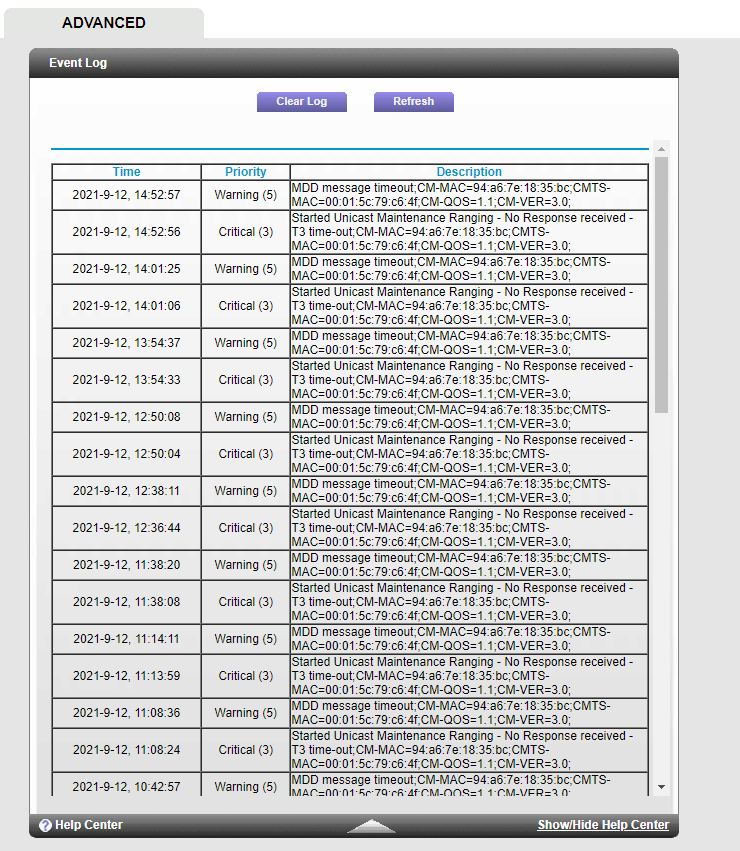
My Modem Details: Hardware Version C312T00-01 Firmware Version V1.01.12 Cable Modem Serial Number 48L50B7FA3805 CM Certificate Installed CM M...

plemans
Sep 12, 2021Guru - Experienced User
Your logs are indicating line issues.
do you have a screen snip of the cable connections page?
Check for splitters, signal attenuators, and amplifiers in line. Remove them if you do.
check the line for kinks, damage, old/loose/bad/corroded connections and replace them if needed.
I'd move the modem to right where the coax enters the home and connect it there.
deanosauruz
Sep 14, 2021Aspirant
After checking the cables I find no erosion ordamaged cables, and I do not have any splitters, signal attenuators, and amplifiers.
the modem is as close to the coax entry point as physically possible.
Could there be a damaged line outside?
I speed test and i get acceptable speeds yet sometimes a website on my desktop will show a DNS failed page buit then within seconds suddenly appears to load the page....
I have attached a screen capture of the connections page
- deanosauruzSep 14, 2021Aspirant
For some reason the attached image didn't appear with my reply.
- plemansSep 14, 2021Guru - Experienced User
your cable connections page looks pretty good.
What router do you have the modem connected to?
- deanosauruzSep 15, 2021Aspirant
I have an Archer A6 https://www.tp-link.com/us/home-networking/wifi-router/archer-a6/v2.8/
- plemansSep 15, 2021Guru - Experienced User
The signal looks good from the quick snapshot that page loads. But your logs indicate the power is going in/out of spec.
