NETGEAR is aware of a growing number of phone and online scams. To learn how to stay safe click here.
Forum Discussion

Laronski71
Feb 04, 2022Aspirant
Create QOS Rules for MAC Address
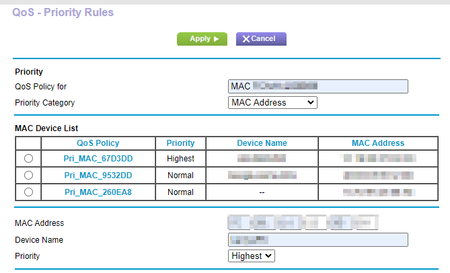
I have a R6700v3 Firmware Version V1.0.4.122_10.0.95. This is a BRAND NEW ROUTER. I'm trying to as a QOS rule for a MAC address. I go in to Advanced» QOS Setup » QoS - Priority Rules. I choose ...
- Feb 09, 2022
I didn't have any other QOS rules in place. The router simply would not accept them. I was really expecting a quick response to my question, so as I was waiting, I just decided to do a factory reset. Starting from scratch is never fun, but the factory reset was able to allow the QOS rules. AND while the router did show that I had 30+ devices connected to the router, it only listed three that was available for QOS rules; I had to enter my rule manually using a Mac address. So something is still wrong there.
The router is functioning as I wanted to right now; that was the goal. So I consider this problem semi-resolved. Netgear still need to figure out why their device is not functioning correctly.
I hope this helps...
Peobody
Feb 09, 2022Guide
Do you have any other QoS rules? I ask because I have a R6400v2/AC1750 on which, after installing 1.0.4.122_10.0.95, the GUI will hang whenever I attempt to add a QoS rule. A power cycle of the router is required in order to access it again and the QoS rule that I attempted to save does not stick. I wonder if I am experience the same error condition just without the error message displayed. QoS worked fine when on 1.0.4.106. A factory reset was done prior to the install of 1.0.4.122. A manual reinstall of 1.0.4.122 was also done but no joy.
- Laronski71Feb 09, 2022Aspirant
I didn't have any other QOS rules in place. The router simply would not accept them. I was really expecting a quick response to my question, so as I was waiting, I just decided to do a factory reset. Starting from scratch is never fun, but the factory reset was able to allow the QOS rules. AND while the router did show that I had 30+ devices connected to the router, it only listed three that was available for QOS rules; I had to enter my rule manually using a Mac address. So something is still wrong there.
The router is functioning as I wanted to right now; that was the goal. So I consider this problem semi-resolved. Netgear still need to figure out why their device is not functioning correctly.
I hope this helps...