NETGEAR is aware of a growing number of phone and online scams. To learn how to stay safe click here.
Forum Discussion
kcjudd
Aug 11, 2021Aspirant
Devices and Printers - Genie Media
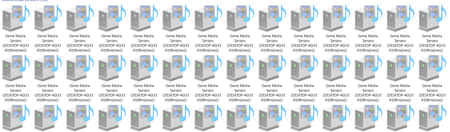
I am now getting multiple Genie Media Servers showing up in Devices and Printers. How do I stop them from showing up? Does anyone have any suggestions? Thank you, KC Judd
michaelkenward
Aug 12, 2021Guru - Experienced User
This genie is? Netgear desktop?
You have a Netgear routers of some sort?
What is it?
- kcjuddAug 13, 2021Aspirant
This started recently, and I do not know of any changes. I have done the Microsoft updates, but other than that, no network changes, no added devices.
- michaelkenwardAug 13, 2021Guru - Experienced User
Do you have the Netgear destop genie installed on your Windows PC?
These devices are, as the name says, Media Servers. They can show up when you have DLNA enabled. Is your R6220 configured to act as a ReadyDLNA media server?
Genie Media Servers - Google Search
Is there any orther DLNA server on your network?
- kcjuddAug 16, 2021Aspirant
Under the Basic tab, USB Storage, Media Server:
The Media Server Name is ReadyDLNA. None of the boxes are checked, I.e. Enable Media Server and Enable iTunes Server, they are not checked.
The radio button, Content Scan, is checked.