Forum Discussion

mastermjr2004
Jul 04, 2016Tutor
Lenovo Iomega IX2 4TB Personal Cloud Port triggering not working!
Hi, I hope you are all well. I have a Lenovo Iomega IX2 4TB. I have set the nas accordingly being able to access network shares ect, but cannot seem to connect externally using Personal Cloud. I h...
 Jul 04, 2016
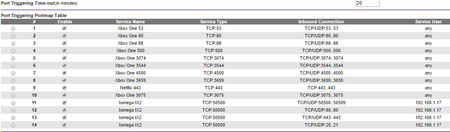
searay is right. You should be using port forwarding, not port triggering, for Personal Cloud. Port triggering works by opening inbound port(s) whenever an outbound port is accessed. For gaming, this is fine because you initiate things from your XBox. But see below for a concern. For Personal Cloud, a remote user initiates the access but will this fail because the port will not have been triggered by an outbound access.
Based on my reading of the Personal Cloud setup documentation, it should only be necessary to open the Personal Cloud service port (in your case, 50500). You should not need to open port 80, 443, 20 or 21 unless you want to provide remote http, https, ftp access, respectively, to your IOMega. These ports do not appear to be required for Personal Cloud. I don't own an IX2, so I could be mistaken. Reference: How do I set up my router for Personal Cloud?
As for your Xboxes, are you really getting open NAT when using both of them simultaneously? Just like port forwarding, port triggering only opens a port to one device at a time; port triggering differs by being able to do it dynamically. But two Xboxes can't simultaneously use port 3074, for example. You should consider using UPnP instead of port triggering for your Xboxes. But, hey, if your current setup is working, then leave well enough alone.
Retired_Member
Jul 04, 2016Not an expert on triggering, But open NAT might be a concern.......
It also appears triggering isn't working for your cloud I beleive it should be forwarding not triggering But Hey what do I know?
Good Luck
TheEther
Jul 04, 2016Guru
searay is right. You should be using port forwarding, not port triggering, for Personal Cloud. Port triggering works by opening inbound port(s) whenever an outbound port is accessed. For gaming, this is fine because you initiate things from your XBox. But see below for a concern. For Personal Cloud, a remote user initiates the access but will this fail because the port will not have been triggered by an outbound access.
Based on my reading of the Personal Cloud setup documentation, it should only be necessary to open the Personal Cloud service port (in your case, 50500). You should not need to open port 80, 443, 20 or 21 unless you want to provide remote http, https, ftp access, respectively, to your IOMega. These ports do not appear to be required for Personal Cloud. I don't own an IX2, so I could be mistaken. Reference: How do I set up my router for Personal Cloud?
As for your Xboxes, are you really getting open NAT when using both of them simultaneously? Just like port forwarding, port triggering only opens a port to one device at a time; port triggering differs by being able to do it dynamically. But two Xboxes can't simultaneously use port 3074, for example. You should consider using UPnP instead of port triggering for your Xboxes. But, hey, if your current setup is working, then leave well enough alone.
- mastermjr2004Jul 11, 2016Tutor
Hi,
Thank you so much for your help and support. I can confirm that Port forwarding now works and my Personal Cloud works accordingly. :)
Kind regards,
Matt