NETGEAR is aware of a growing number of phone and online scams. To learn how to stay safe click here.
Forum Discussion

Morgan1132
Dec 28, 2020Aspirant
Nighthawk R7000P Port Forwarding Not Working
Firmware V1.3.1.64_10.1.36 I have a Synology NAS which is setup to automatically connect to router and setup required port forwarding using UPnP. I am also using Synology DDNS service. I hav...
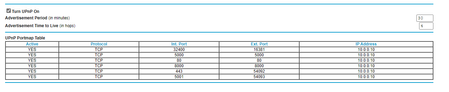
- Dec 28, 2020
Turns out my suspicions were correct and it was ISP settings. Quick 2 minute webchat to my ISP and everything is woring correctly. Wish I had of started here...
Hopefully someone trawling forums for solutions comes accross this.
antinode
Dec 28, 2020Guru
> [...] as below. [...]
I can't (yet) see your pictures. In-line images must be approved by
a moderator before others can see them. The time required varies.
Attachments have no such limitation. Of course, attachments have their
own one-per-message limitation. Copy+paste (of plain text) is your
friend.
> For info, I have attempted manual setup of the same port forwarding
> rules with the same result.
I'd do that, and disable UPnP. I like to have explicit control over
incoming connections.
For the usual problems with port forwarding, see:
- Morgan1132Dec 28, 2020Aspirant
Photos appear to be working now. I'm starting to suspect its something to do with ISP setup? How can I troubleshoot further? My only concern is where some others have mentioned updating firmware or even rolling back firmware has solved uPnP issues
- Morgan1132Dec 28, 2020Aspirant
Turns out my suspicions were correct and it was ISP settings. Quick 2 minute webchat to my ISP and everything is woring correctly. Wish I had of started here...
Hopefully someone trawling forums for solutions comes accross this.
- antinodeDec 28, 2020Guru
> Turns out my suspicions were correct and it was ISP settings. [...]
That (non-)description conveys approximately no useful information.
> [...] Quick 2 minute webchat to my ISP and everything is woring
> correctly. [...]The _chat_ solved it, or did you need to change some setting(s)
someplace?> Photos appear to be working now. [...]
If your server's LAN IP address is "10.0.0.10" because there is
(was?) another router between your R7000P and your ISP, then that would
explain many things.> [...] I used powershell command to test connection, [...]
Now that I can see it, that makes less sense than I had expected.
What was the point of those "ping" tests?
> Hopefully someone trawling forums for solutions comes accross this.That might be nice if there were some useful information here. What,
exactly, do expect anyone to gain from a (non-)description like yours?