NETGEAR is aware of a growing number of phone and online scams. To learn how to stay safe click here.
Forum Discussion

xenalbaran
Jan 14, 2021Aspirant
port forwarding on AC 1200 router not working
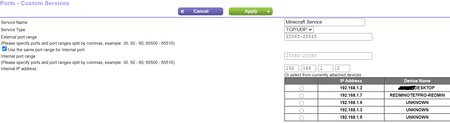
I am trying to setup a minecraft server for which I need to port forward the 25565 port. I have the minecraft server up and running and made sure its using the port 25565. I also made sure that my co...
antinode
Jan 14, 2021Guru
> Model: R6120|AC1200 Dual Band WiFi Router
Firmware version? Connected to what?
> I am trying to setup a minecraft server [...]
On the device at "192.168.1.2"?
> [...] still my friends can't join to my minecraft server. [...]
"can't" is not a useful problem description. It does not say
what you did. It does not say what happened when you did it. As usual,
showing actual actions (commands) with their actual results (error
messages, LED indicators, ...) can be more helpful than vague
descriptions or interpretations.
For the usual problems with port forwarding, see:
https://community.netgear.com/t5/x/x/m-p/1859106
Note that completely obscuring your external/public IP address is not
helpful.
xenalbaran
Jan 14, 2021Aspirant
Model: R6120|AC1200 Dual Band WiFi Router
> Firmware version? V1.0.0.76 Connected to what? Router is connected to broadband and Computer is connected to the router with ethernet. not sure if that's what you were asking
> I am trying to setup a minecraft server [...]
On the device at "192.168.1.2"? Yes. I have also reserved this address for this particular computer to avoid problems after restarting router
>In minecraft, I gave my friends my public IP address which I got from https://www.whatismyip.com/
I asked them to add a new server in minecraft multiplayer but they got an error message which I am attaching a screenshot of.
All four LED indicators of my router are on and I see no change in it.
I am not sure what help could my real public IP address be but its something like this 1.186.***.***

- antinodeJan 14, 2021Guru
> [...] Router is connected to broadband [...]
What, exactly, does "broadband" mean to you? A cable? A modem? A
modem+router? An ONT? Maker? Model number? Any useful information at
all?> I am not sure what help could my real public IP address be but its
> something like this 1.186.***.***Ok, that's a public address. Now, what's the IP address of the
WAN/Internet interface on your _router_ (ADVANCED > ADVANCED Home :
Internet Port : Internet IP Address)? Same or different?> [...] they got an error message which I am attaching a screenshot of.
"Connection timed out" is a pretty general communication failure.
> For the usual problems with port forwarding, see:
>
> https://community.netgear.com/t5/x/x/m-p/1859106Plenty of questions and tests in there. (Look for "?" and "try".)
Not many answers and results in here. You seem to have item 2 covered.
I (still) suspect item 1, but only one of us can see your router's
WAN/Internet IP address.