NETGEAR is aware of a growing number of phone and online scams. To learn how to stay safe click here.
Forum Discussion

Tobias6483
Feb 26, 2021Aspirant
Portforward (router + unknown device modem?? or)
Hello :) So i've just moved house, and I want to portforward. I tried portforwarding at my default gateway (192.168.1.1 - R6250 router) But when I go to canyouseeme.org it shows that the port is cl...
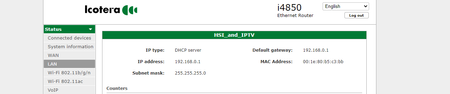
Tobias6483
Feb 26, 2021Aspirant
In case you can't see the pictures.. Here is a normal imgur link..
- antinodeFeb 26, 2021Guru
> [...] maybe its because my internet has modem and router?
That'd be my diagnosis. ADVANCED > ADVANCED Home : Internet Port :
Internet IP Address shows a private address, not your public address.Are you offering any better hints as to what that equipment might be?
Most likely, you should be using one router, not two. Typical
one-router schemes involve either a modem-only and a router, or else a
modem+router and a wireless access point. Which would you prefer?Possibly interesting (the usual problems with port forwarding):
https://community.netgear.com/t5/x/x/m-p/1859106
Your problem appears to be "1" (at least).- Tobias6483Feb 27, 2021Aspirant
I live in a home with couple of floors
"Internet port" has a options in the gateway to portforward aswell as the r6260 netgear
But i don't know what its used for tbh( the internet port gateway)
Im used to just login to 192.168.1.1 and portforward - and boom it works.
it says that the "internet port" in advanced home is the ethernet router.. and i have ethernet into my pc not wifi
But I dont know what to do, to make my portforward work. I tried portforward in the "internet port" gateway - but its say something like "IP address of port forwarding rule 1 is not within IP range of any bridge in route"
And when i portforward in the default gateway 192.168.1.1 it says connection timed out when i check if the port is open
- antinodeFeb 27, 2021Guru
> I live in a home with couple of floors
This tells me what, exactly?
> "Internet port" has a options in the gateway to portforward aswell as
> the r6260 netgearAre you trying to say that your "home" has some sort of (unspecified)
"the gateway", and that you're connecting your R6250 to that "the
gateway"? "gateway" normally means "modem+router". That would make two
routers.> Most likely, you should be using one router, not two. [...]
Still true.
> Im used to just login to 192.168.1.1 and portforward - and boom it
> works.
That's fine when your router is the only router.> it says that the "internet port" in advanced home is the ethernet
> router..It's an address on the LAN subnet of that "the gateway". I saw that.
> [...] i have ethernet into my pc not wifi
Doesn't matter. A network connection is a network connection.
> But I dont know what to do, to make my portforward work. [...]
> Most likely, you should be using one router, not two. [...]
Still true.
> [...] Typical one-router schemes involve either a modem-only and a
> router, [...]
I assume that other people are using that "the gateway" as their
router, so that scheme is not an option.> [...] or else a modem+router and a wireless access point. [...]
That would be the one remaining option.
Visit http://netgear.com/support , put in your model number, and look
for Documentation. Get the User Manual (at least). Read. Look for
"Use the Router as a WiFi Access Point Only".> [...] I tried portforward in the "internet port" gateway [...]
I can't see what you "tried". There were numbers in it, right?
> [...] - but its say something like "IP address of port forwarding rule
> 1 is not within IP range of any bridge in route"
Because it can do port-forwarding only to an IP address on its own
LAN. If you configure your R6250 as a WAP, then all your devices will
be on the LAN of that 'the "internet port" gateway', so that complaint
should disappear.> And when i portforward in the default gateway 192.168.1.1 it says
> connection timed out when i check if the port is openSame problem, same solution.
Note, however, that with the R6250-as-WAP, you will be sharing the
LAN with other users of that 'the "internet port" gateway'. It's not as
private as having your own router.