NETGEAR is aware of a growing number of phone and online scams. To learn how to stay safe click here.
Forum Discussion

kchumps
Jan 31, 2020Star
R6220 Internet LED not working
As of maybe two hours ago, I can no longer connect to my router. I still have a connection if I plug my pc into the modem, but that's a PITA. Any suggestions? Resetting does nothing. I tried that tip ...
- Jan 31, 2020
What are all the lights on the router doing?
What modem are you using?
did it randomly stop or what were you doing when it disconnected?
Can you hardwire into the router to access the gui?
Have you tried a factory reset? Push and hold reset while its powered on for 7-15 seconds. The lights should change.

plemans
Jan 31, 2020Guru - Experienced User
What are all the lights on the router doing?
What modem are you using?
did it randomly stop or what were you doing when it disconnected?
Can you hardwire into the router to access the gui?
Have you tried a factory reset? Push and hold reset while its powered on for 7-15 seconds. The lights should change.
kchumps
Jan 31, 2020Star
What are all the lights on the router doing?
- Power light is solid green. Wi-Fi light is blinking, WPS light is on.
What modem are you using?
- Surfboard SB6141
Did it randomly stop or what were you doing when it disconnected?
- Randomly stopped at like 9:30 this morning, was on my PS4
Can you hardwire into the router to access the gui?
- Can I do that if there's no signal?
Have you tried a factory reset? Push and hold reset while its powered on for 7-15 seconds. The lights should change.
- No, I'll try that now
- plemansJan 31, 2020Guru - Experienced User
kchumps wrote:What are all the lights on the router doing?
- Power light is solid green. Wi-Fi light is blinking, WPS light is on.
What modem are you using?
- Surfboard SB6141
Did it randomly stop or what were you doing when it disconnected?
- Randomly stopped at like 9:30 this morning, was on my PS4
Can you hardwire into the router to access the gui?
- Can I do that if there's no signal?
Have you tried a factory reset? Push and hold reset while its powered on for 7-15 seconds. The lights should change.- No, I'll try that now
the lights are on which is a good sign.
You don't need to access it via wifi. You can hardwire a device to the router. Its how I recommend everyone for whenever they're updating firmware to do it.
wifi blinking usually means data is transmitting/receiving. Which is a good sign.
Did you try rebooting both the modem and router?
Make sure to power up the modem first. give it a few minutes and then boot the router.
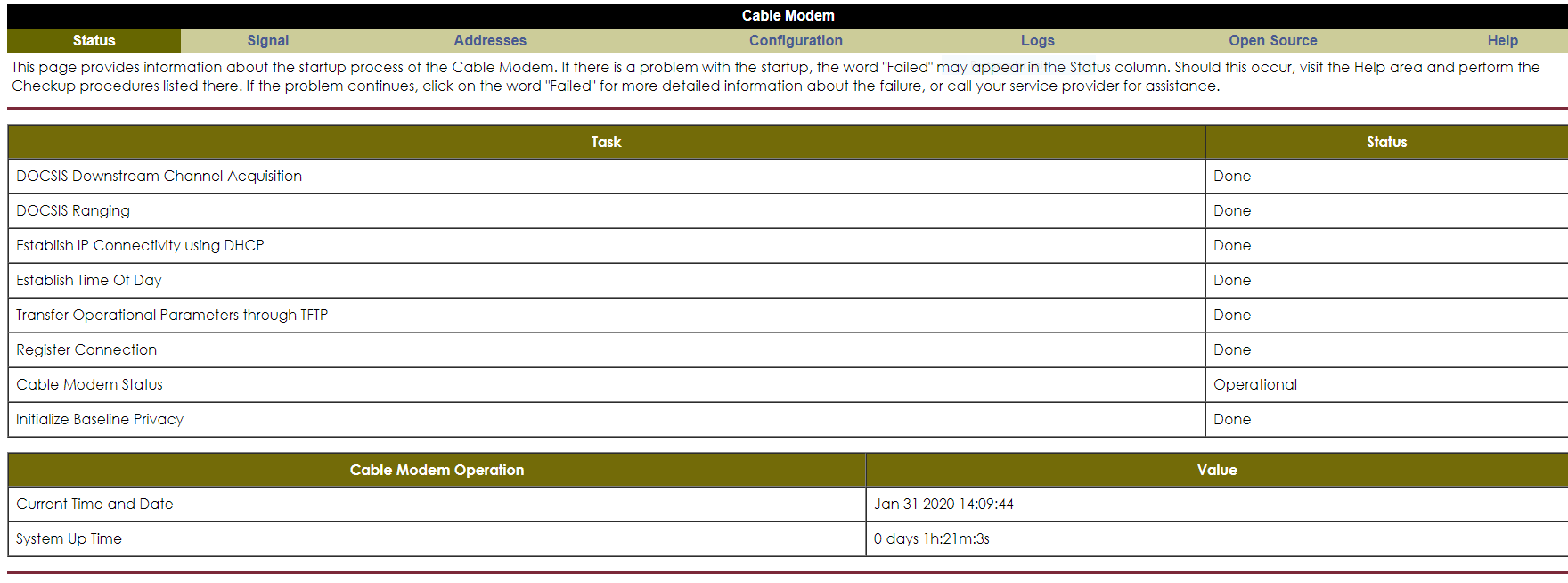
Many times if your wifi/ethernet are working but you're getting "no internet available" it can be a modem issue. go to 192.168.100.1. This should be the ip address for the modem. You can log into it and see its modem connections page. Take a screen snip of that and post it back if the rebooting/resetting doesn't fix the issue.
- plemansJan 31, 2020Guru - Experienced Userbtw, here's the support site for your device.
https://www.netgear.com/support/product/R6220.aspx - kchumpsJan 31, 2020Star
Oh, I misunderstood. I have to be plugged into the modem to have a connection, so I don't think I can plug into the router at the moment. Resetting them both didn't work earlier today, and that site says it's all fine. I've seen a couple of posts specifically about the R6200 not detecting the source, though none of the solutions made any sense. Let me know if that's the wrong tab to take a picture of, lol. It seems counterintuitive for the Wi-Fi light to be the one that's on, and not the internet
- kchumpsJan 31, 2020Star
Also I forgot to say, thanks for your help! I appreciate any and all time you're willing to give to this nuisance
- plemansJan 31, 2020Guru - Experienced User
kchumps wrote:Also I forgot to say, thanks for your help! I appreciate any and all time you're willing to give to this nuisance
No worries! Glad to help.
On the modem, click on signal. take the screen snip of that. it shows the modem signal to the ISP. Does your internet work directly connected to the modem?
Are you connected directly to the modem or going through the router?
if your connecting through the router to the modem, its pulling a signal from the modem. Then its on the modem to provide the public ip to the router.