NETGEAR is aware of a growing number of phone and online scams. To learn how to stay safe click here.
Forum Discussion

Lynch30
Mar 03, 2016Aspirant
R6400/WNDR3400 Wifi isssues
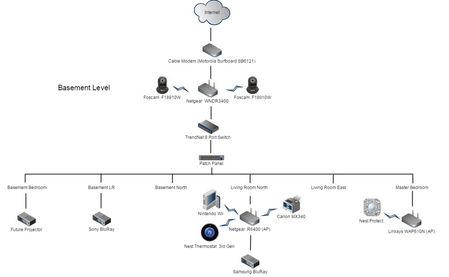
Hi all, Hoping to get some insight on Wi-Fi issues I'm currently seeing at home. My house is wired with Cat5e throughout. When I plug a network cable into any jack in the house and run a speedt...
- Mar 04, 2016
Hi Elaine,
Thanks for the response. I was able to figure out the issue last night and it turned out to be an oversight on my part. I noticed every once in awhile when I was running speed tests on a hardwired connection to a network outlet in the house, the ethernet adapter on the laptop would sometimes randomly enable and disable on its own. I started to put 2 and 2 together and realized it could be a problem with the switch. When I was setting up the switch a couple days ago I ended up using a wrong power adapter that although it fit, it wasn't supplying enough voltage to the switch. Once I swapped over to the correct power adapter for the switch, rebooted everything and tried another speedtest, it was much improved at 35 mbps download.

ElaineM
Mar 04, 2016NETGEAR Employee Retired
Hello Lynch30 I suggest that you try to isolate first by determining from signal is giving the 2Mbps.
You mentioned that they are all using the same exact SSID which I assume for seamless roaming.
Turn off all other wireless and verify which wireless device that gives you the low speed.
By the way, is this happening on both wireless signals (2.4GHz/5GHz)?
Since all firmwares are updated, did you reset the device after upgrading?
Make sure as well that there are no other device that may cause interference such as cordless phones, microwave ovens, baby monitors and the likes.
Lynch30
Mar 04, 2016Aspirant
Hi Elaine,
Thanks for the response. I was able to figure out the issue last night and it turned out to be an oversight on my part. I noticed every once in awhile when I was running speed tests on a hardwired connection to a network outlet in the house, the ethernet adapter on the laptop would sometimes randomly enable and disable on its own. I started to put 2 and 2 together and realized it could be a problem with the switch. When I was setting up the switch a couple days ago I ended up using a wrong power adapter that although it fit, it wasn't supplying enough voltage to the switch. Once I swapped over to the correct power adapter for the switch, rebooted everything and tried another speedtest, it was much improved at 35 mbps download.