NETGEAR is aware of a growing number of phone and online scams. To learn how to stay safe click here.
Forum Discussion

DrakeSilvos
Oct 15, 2021Aspirant
Random drops on R6020
Repost here since I thought it was a Nighthawk. So the connection on this will randomly cut out for up to 30 seconds at most at least once an hour, sometimes even thrice. I updated it to FW 1.0.0...
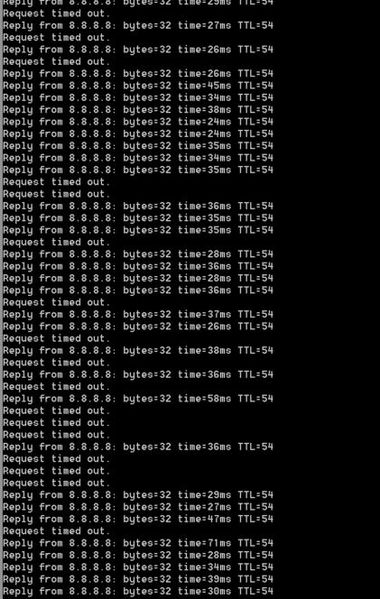
- Oct 15, 2021
What channels are you using? Auto? Try setting manual channel 1, 6 or 11 on 2.4Ghz and 40 to 48 channel on 5Ghz.
Any Wifi Neighbors near by? If so, how many?

FURRYe38
Oct 15, 2021Guru - Experienced User
This happening over a wired and wireless connection?
Have the ISP check the signal and line quality UP to the modem. Be sure the ISP provisions the modem correctly.
Be sure there are no coax cable line splitters in the between the modem and ISP service box.
Be sure your using good quality RG6 coax cable up to the modem.
Be sure to power OFF the modem for 1 minute then back ON.
https://community.netgear.com/t5/Cable-Modems-Routers/General-info-and-Troubleshooting-for-Cable-Modems/m-p/1530376#M12853
https://highspeed.tips/docsis-events/
Try the factory reset.
DrakeSilvos
Oct 15, 2021Aspirant
Yeah I've gone through the motions with Spectrum and they said the modem is fine. And yeah this happens on wired too.
- DrakeSilvosOct 15, 2021Aspirant
It's also happening much more frequently the past few days, possibly a result of me trying different channels I can't tell. At this point I'm just considering a new router.
- FURRYe38Oct 15, 2021Guru - Experienced User
What channels are you using? Auto? Try setting manual channel 1, 6 or 11 on 2.4Ghz and 40 to 48 channel on 5Ghz.
Any Wifi Neighbors near by? If so, how many?- DrakeSilvosOct 15, 2021Aspirant
2 neighbours, I've had it happen with every channel.
Edit: Though strangely it's been fine for the past hour now that I'm trying 6 again, with 5ghz on 153. Whereas for the whole day it was having those drops almost every 10 minutes. Bizarre.