NETGEAR is aware of a growing number of phone and online scams. To learn how to stay safe click here.
Forum Discussion

edwardstx
Oct 13, 2017Aspirant
Router Update R6400
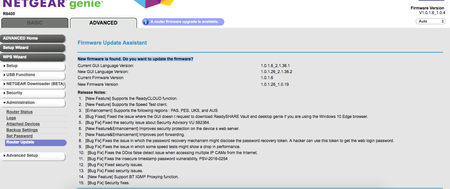
I recieved an email saying we were due for a router update. I logged in and followed all of the steps. When I get to the page in the screenshot below there is no "yes" button to continue as there is ...
- Oct 14, 2017
I'm afraid your screen show is too small for my aged eyes, so I may be missing something, but there is a manual for your device somewhere at the end of this link:
>>> R6400 | Product | Support | NETGEAR <<<
The firmware should also be there so you can save it and do a manual update. See page 133.
The release notes will explain how to update manually.
R6400 Firmware Version 1.0.1.26 | Answer | NETGEAR Support

michaelkenward
Oct 14, 2017Guru - Experienced User
I'm afraid your screen show is too small for my aged eyes, so I may be missing something, but there is a manual for your device somewhere at the end of this link:
>>> R6400 | Product | Support | NETGEAR <<<
The firmware should also be there so you can save it and do a manual update. See page 133.
The release notes will explain how to update manually.
R6400 Firmware Version 1.0.1.26 | Answer | NETGEAR Support
- edwardstxOct 14, 2017Aspirant
Thank you! I was able to follow those steps this morning to update it!