NETGEAR is aware of a growing number of phone and online scams. To learn how to stay safe click here.
Forum Discussion

miketwo
Apr 08, 2018Aspirant
Struggling with Port Forwarding
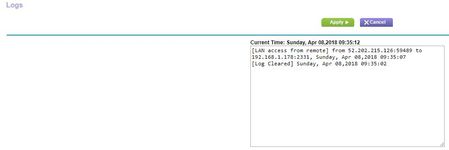
I'm going nuts trying to get this to work... I have a wireless WansView IP Camera set up on a static local IP and port: 192.168.1.178:2331 When I visit that address, I get the camera. So far, so...
miketwo
Apr 08, 2018Aspirant
Thanks for the rapid response!
> Is that accurate? Firmware version?
Hardware Version R6300v2
Firmware Version V1.0.3.6_1.0.63CH
> That's "http://192.168.1.178:2331"?
Correct. Although my browser seems to drop the protocol portion. I guess it doesn't care.
> What are the first two octets ("a.b" out of "a.b.c.d") in your public IP address?
68.184.x.x
> Same thing or different things?
Same, yes. Sorry for using different terms.
> Are you doing this from inside the LAN or from the outside world? (Both should work.)
Both. I'm testing from inside the LAN (my desktop on wifi) and from the canyouseeme site. Interestingly, I just tried it from my phone with wifi turned off (forcing it onto the cellular network) and the only difference is that for port 80 I do not get the router's login page. I'm guessing that's some default security setting on the router.
> That sounds ok to me. Copy+paste of the actual rule would be
reassuring. As I write, the in-line pictures are still obscure, waiting for
moderator approval.
The pic is a screenshot of the rule, but I'll try pasting the table here:
| # | Service Name | External Start Port | Internal Start Port | Internal IP address | |
| 1 | MooseCam | 2331 | 2331 | 192.168.1.178 |
Last thing I should mention -- I have a dual-boot Windows 10/Ubuntu system, so I can use tools on either OS to help diagnose. I tried a public traceroute (http://www.monitis.com/traceroute/) but didn't really understand the results. Network stuff is not my strong suit.
antinode
Apr 08, 2018Guru
> Firmware Version V1.0.3.6_1.0.63CH
Oooh. Charter-specific firmware. You could have atypical problems.
> 68.184.x.x
Sounds like Charter.
> [...] Although my browser seems to drop the protocol portion. I guess
> it doesn't care.
Modern browsers typically hide the annoying "scheme://" details, so
you don't get confused by reality.
> [...] the only difference is that for port 80 I do not get the
> router's login page. I'm guessing that's some default security setting
> on the router.
Yup. Perhaps: ADVANCED > Advanced Setup > Remote Mangement. These
routers seem to be willing to allow access unconditionally from the LAN,
but enforce the restrictions on access from the WAN.
I could be missing something, but it all looks good to me. I know
nothing, but the "CH" firmware worries me. You might see if Charter
knows anything, or if you can find a Charter-user forum where more
people might know more.