NETGEAR is aware of a growing number of phone and online scams. To learn how to stay safe click here.
Forum Discussion

SrDocDiva
Nov 20, 2020Aspirant
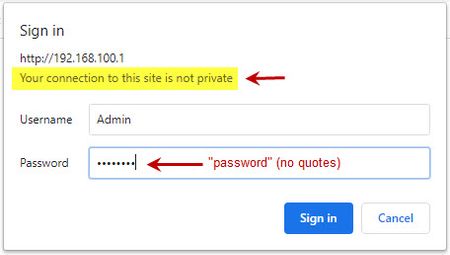
Unable to log into http://192.168.100.1 because "Your connection to this site is not private"
I've searched through this community and haven't found a solution that works for me. I saw that a few people (such as, tmbrwolf ) have had the same problem which was solved by resetting the modem - I...
- Dec 02, 2020
After calling Eero, and then calling Xfinity.. I called Netgear, explained the problem and they opened a case #, then transferred me to technical support. I was on hold for nearly 25 minutes. So, I hung up and called them back (same number I called before). In the meantime, they closed my case # ! Then they gave me a new case #, transferred me to Technical Support *again*. After another 20 minutes, I hung up.
Given what I paid for this new modem and the new Eero router (total over $1,000.00), these hassles are not worth it.
SOLUTION: Returned this modem and the new router to Best Buy for a full refund. For the cost of Xfinity's monthly modem/router rental, I can rent for years.
> Get over it.
Back 'atcha there antinode. Your arrogrant attitude is extremely unhelpful.
Don't bother replying. I'm out of here. Bye!
antinode
Nov 20, 2020Guru
> Unable to log into http://192.168.100.1 because "Your connection to
> this site is not private"
It's common to get complaints from a modern web browser when you use
the modem/router's management web site, because the browser is worried
about your sending some user credentials over an unencrypted/insecure
link ("http://" instead of "https://"). The easy thing to do is ignore
the warning, and proceed. Presumably, you're talking to your own gizmo
on your own LAN. If someone can overlisten to that local traffic, then
you're already in big trouble.
> I CANNOT GET PAST THE LOGIN WINDOW. [...]
You need to tell your web browser to let you continue using the "not
private" connection. Then you need to specify the correct user name and
password. Specifying bad (including no) credentials leads to that "401"
error.
- SrDocDivaNov 20, 2020Aspirant
antinode Thank you for replying. Unfortunately, I don't understand your explanation.
> It's common to get complaints from a modern web browser when you use
> the modem/router's management web site, because the browser is worried
> about your sending some user credentials over an unencrypted/insecure
> link ("http://" instead of "https://"). The easy thing to do is ignore
> the warning, and proceed. Presumably, you're talking to your own gizmo
>on your own LAN. If someone can overlisten to that local traffic, then
> you're already in big trouble.I'm trying to access Netgear's modem/router's management website. As I wrote in my initial comments, I just bought this new Netgear Modem "CM1200" - so yes, I suppose you could call it my gizmo (not Xfinity's gizmo) and I'm reading the documentation provided by Netgear. In that documentation, it tells me to go to http://192.168.100.1. When I read the documentation from the manufacturer and explicitly follow their directions, I expect things to work as they say it should.
> You need to tell your web browser to let you continue using the "not
> private" connection. Then you need to specify the correct user name and
> password. Specifying bad (including no) credentials leads to that "401"How do I tell my web browser to let me continue using the "not private" connection? For example, where in Chrome's setting would I find that option? And specifying the correct username and password? Huh? I am using the username and password given as per Netgear's documentation.
Regardless, in the meantime I decided to move on to other tasks - like installing my new WI-FI router and getting all of the various devices attached to it (thermostat, etc). My LAN is now all set up. It's that pesky http://192.168.100.1 that I can't get to. In another thread someone wrote that they were able to access that website from their smart phone. Well, I tried and I can't log on to http://192.168.100.1 from either my iPhone or my iPad, let alone my PC.
By the way, my PC remains hard wired to the modem (Netgear CM1200) via an ethernet cable. The internet is working fine (hence, my abililty to write this comment). I am thinking of changing the set up to attach my PC directly to the router instead of the modem.
Again, thank you for your reply but it doesn't solve the issue I reported. I still want to access the modem management website as per Netgear. And, I'm still concerned about that message, "Your connection to this site is not private". I am unable to proceed with the modem management. <-- this is the problem.
> If someone can overlisten to that local traffic, then
> you're already in big trouble.Exactly. That's the kind of thing Netgear users, like myself, want to prevent.
Question about you - are you employed by Netgear or are you a knowledgable user ("guru") who's here volunteering his/her time to help people?
Thank you again.
- antinodeNov 20, 2020Guru
> How do I tell my web browser to let me continue using the "not
> private" connection? [...]I'd assume that there's some option/control/button on the page
(pop-up?) with the "not private" complaint. (Or just ignore it?)> [...] where in Chrome's setting [...]
I don't know if there's a global setting; I'd expect a per-site
choice. I seldom use Chrome. In Firefox (Mac, at least, but I believe
Windows, too), it seems to remember a previous choice. I go straight
into my D7000, but it does show a lock icon with a red slash through it
(roll-over text: "Connection is not secure").Around here, the "Sign in" box on Chrome says, "Your connection to
this site is not private", but, when I put in the correct credentials,
it works as expected. (With "/!\ Not Secure" before the URL.) Whether
I've already been down this path with Chrome on this Mac is uncertain.
> [...] It's that pesky http://192.168.100.1 that I can't get to. [...]What happens when you try?
"can't" is not a useful problem description. It does not say what
you did. It does not say what happened when you did it. As usual,
showing actual actions (commands) with their actual results (error
messages, LED indicators, ...) can be more helpful than vague
descriptions or interpretations.> By the way, my PC remains hard wired to the modem (Netgear CM1200) via
> an ethernet cable. [...]
That's probably bad. With typical residential service, you get one
external IP address, so you get to connect _one_ device to your modem,
not more. That one device would typically be your router (WAN/Internet
port), and all your client devices would be connected to that router
(LAN ports). If you connect multiple devices to a modem, it's likely
that only one will get a useful Internet connection (and your
external/public IP address). If your computer is not getting a valid IP
configuration (address, et c.), then not getting through to
"192.168.100.1" is the least of your problems.The CM1200 User Manual is less emphatic than it should be about the
limitations/restrictions on the use of this modem's multiple Ethernet
ports, but there are some hints. For example:Note: Your cable modem comes with a plug that covers the LAN 2, 3,
and 4 ports. You can remove the plug to connect a router that
supports Ethernet port aggregation. For more information, see the
cable modem's user manual.
You must, I claim, admire the the quality of documentation which
tells you to read the manual which you are already reading.> [...] And, I'm still concerned about that message, "Your connection to
> this site is not private". [...]Get over it.
> Exactly. That's the kind of thing Netgear users, like myself, want to
> prevent.Which part of "already" was unclear?
> [...] are you employed by Netgear [...]
No. Netgear employees have an "N" icon by their names.
> [...] or are you a knowledgable user [...]
Opinions on that vary widely.
- SrDocDivaDec 02, 2020Aspirant
After calling Eero, and then calling Xfinity.. I called Netgear, explained the problem and they opened a case #, then transferred me to technical support. I was on hold for nearly 25 minutes. So, I hung up and called them back (same number I called before). In the meantime, they closed my case # ! Then they gave me a new case #, transferred me to Technical Support *again*. After another 20 minutes, I hung up.
Given what I paid for this new modem and the new Eero router (total over $1,000.00), these hassles are not worth it.
SOLUTION: Returned this modem and the new router to Best Buy for a full refund. For the cost of Xfinity's monthly modem/router rental, I can rent for years.
> Get over it.
Back 'atcha there antinode. Your arrogrant attitude is extremely unhelpful.
Don't bother replying. I'm out of here. Bye!