NETGEAR is aware of a growing number of phone and online scams. To learn how to stay safe click here.
Forum Discussion

Hesso
Nov 11, 2020Aspirant
Wifi Connection For Two Identical Routers - WNR2000v5
I have two identical WNR2000v5 routers, both have an identical config file loaded (which has the access point turn on, SSID name change etc.), both have the most recent firmware (V1.0.0.74), both ...
- Nov 11, 2020
> [...] Not sure why this worked when I have the same config file, [...]
On my D7000[v1] (V1.0.1.78_1.0.1), not all settings are saved in its
configuration file. The one which I noticed was:
ADVANCED > Advanced Setup > LED Control SettingsWith Netgear's generally low router firmware quality, I would not be
amazed if other fine-print options were similarly ignored in any other
model/version. Trust no one, I always say.> Thanks again [..]
I live to serve. And sometimes even a little bad advice can be
helpful.
Hesso
Nov 11, 2020Aspirant
Wow! Thanks Antinode, I definitely wouldn't have caught that auto channel feature. Using a little utility called 'Wifi Info View' I was able to see that both routers were choosing Ch-4 in Auto Mode. I'm only showing the faster router on Ch-4 below and then I manually change the channel to 11 on Router-B (slower router). Also tried Ch-6.
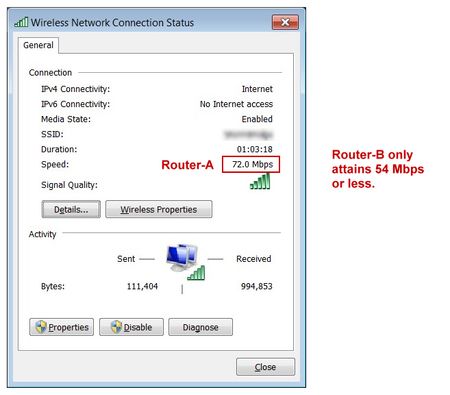
I'm still not all together clear on why I'm seeing the Maximum Speed difference - where the red arrow is (that assumes Ch's 6 & 11 might be better). So Router-B was about the same using the Auto Channel 4 and manually setting it to 6 & 11 (my router goes to 11) :smileyvery-happy:
Some other oddities too (like the wifi type-PHY Type 802.11g/n vs 801.11g only - also auto feature?) and weird that the faster router seems to have a slightly lower signal quality and a higher Detection Count, which I'll have to school myself on.
Hesso
Nov 11, 2020Aspirant
Huh, in another topic thread, someone mentioned checking the WMM to on. Not sure why this worked when I have the same config file, but it did enable both 802.11b 'and' g which has correct the speed for the connection to the second router.
Thanks again Antinode, it would have taken a LOT of time stumbling around had I not started at the channel issue.
- antinodeNov 11, 2020Guru
> [...] Not sure why this worked when I have the same config file, [...]
On my D7000[v1] (V1.0.1.78_1.0.1), not all settings are saved in its
configuration file. The one which I noticed was:
ADVANCED > Advanced Setup > LED Control SettingsWith Netgear's generally low router firmware quality, I would not be
amazed if other fine-print options were similarly ignored in any other
model/version. Trust no one, I always say.> Thanks again [..]
I live to serve. And sometimes even a little bad advice can be
helpful.- HessoNov 12, 2020Aspirant
antinode wrote:> On my D7000[v1] (V1.0.1.78_1.0.1), not all settings are saved in its
configuration file. The one which I noticed was:
ADVANCED > Advanced Setup > LED Control SettingsWith Netgear's generally low router firmware quality, I would not be
amazed if other fine-print options were similarly ignored in any other
model/version. Trust no one, I always say.>
I think this is the solution antinode i.e., Under the Advanced tab/Setup/QoS Setup, the 'Enable WMM (Wi-fi multimedia)' setting was not saved in the config file. Not being checked prevented devices trying to connect via wi-fi, to not utililize the faster 802.11 protocol.