NETGEAR is aware of a growing number of phone and online scams. To learn how to stay safe click here.
Forum Discussion

LPC
Sep 15, 2015Star
Fresh Costumer to ReadyNAS 104, quick review and some questions...
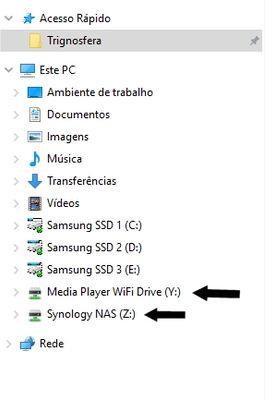
Hello dear friends... For some years now, i have being using home NAS to Cloud Services, since the BITCASA Fiasco, where i lost some very important files that where irreplacable... Being a very cau...

LPC
Sep 17, 2015Star
Hello again,
Im have been testing the nas because of the low performance... and i have tested several options...
But without any sucess...
I have tryed both manual and auto settings for the lan, doesn´t alter nothing...
I have also deactivate the Anti-virus, doesn´t alter nothing...
Here is the testing that a made... very poor numbers...
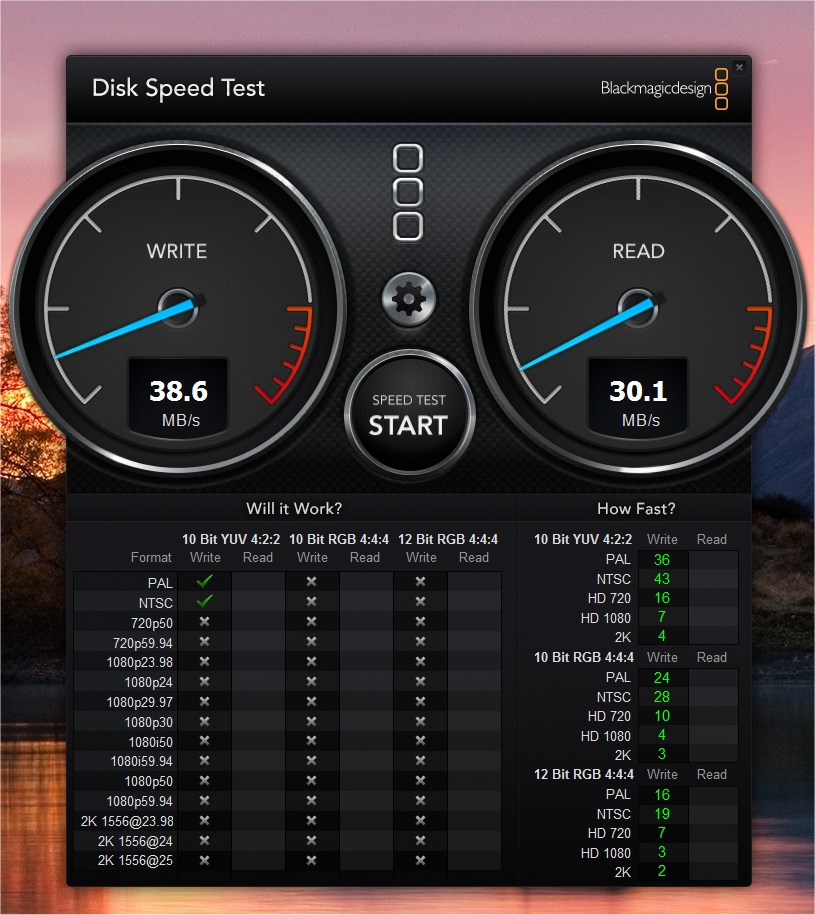
Any ideas on what is going on?
The router is a NETGEAR 1750Mbits Router.
Best Regards,
Paulo Eduardo
LPC
Sep 17, 2015Star
Hello...
More testing on this issue...
I forgot to tell that i am using the 5G connection to Netgear Router, all the cables from the router and NAS are Cat6 and every port is Gigabit.
Also my Wireless card is an TP-Link Archer PCI-E T8E 1750Mbits
- http://www.tp-link.pt/products/details/cat-11_Archer-T8E.html
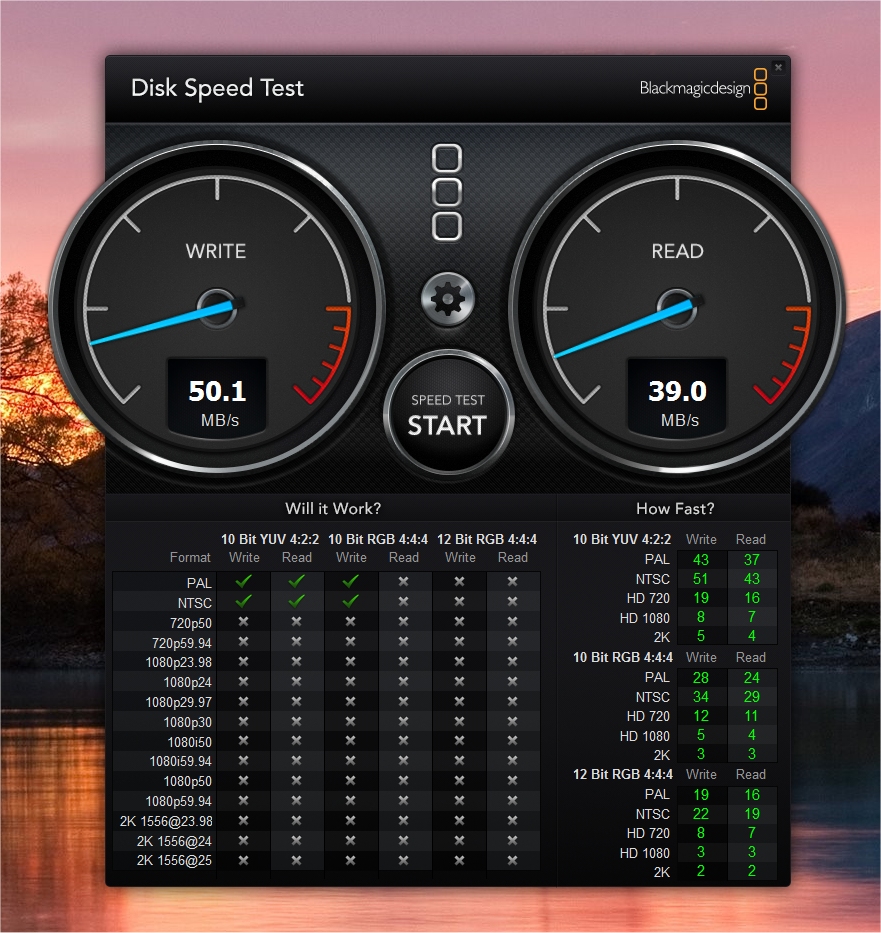
I have run the same test with my older Synology NAS (Diskstation DS214se), and incredibly the results are superior!
How can this be? Its way slower, its just 2 discs in raid 1 and even they are not NAS disks... just WD Green!
Here is the test:
After this i went to get a wired rj45 cable and pluged directly to the computer and router...
Rerun the tests on both NAS´s.... First NETGEAR ReadyNAS 104...
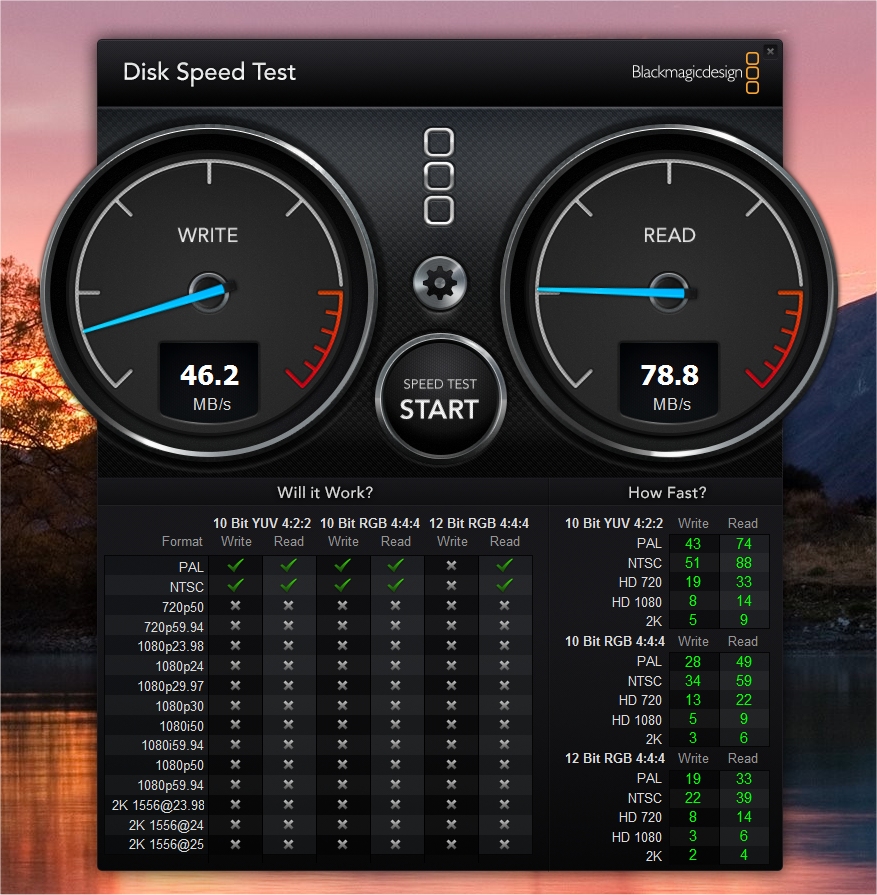
And now the same test on the Synology DiskStation DS214se...
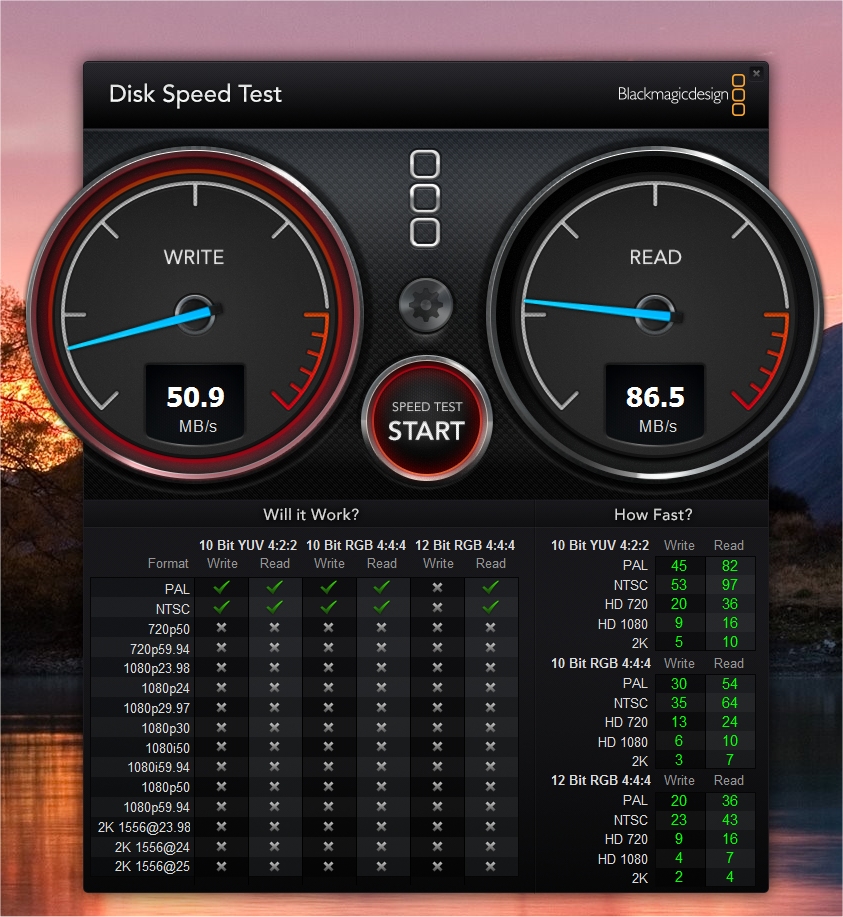
Again i see higher numbers from an less powerfull NAS... Care to elaborate why is that?
Also something is really messing up with the Wifi-Speeds! Im runing Win10 on all the PC´s so i can´t really test on another platform...
I have a Minix on the living room...
Thanks for your thoughts...
Best Regards,
Paulo Eduardo
 EskenderNGSep 18, 2015NETGEAR Employee Retired
Hello Paulo,
it took me some testing on my network to get the transfer rate up on the 5 GHz side a couple of months back. I think one of the problem is that although the majority of devices is using 2,4 Ghz, the ones transmitting at 5 Ghz are often using the same channels and therefore have to share bandwidth. Especially, because with 80 Mhz wide channels, 4 channels are occupied. This is most likely due to bad configuration, inability to choose higher channels, or configuration for North America (then omitting channels between 48 and 140). At my home it was preferable to use channels in the three digit range and also below 120. Most neighbours seemed to be on channels 36+40+44+48. In some areas weather radar my disturb channels at 120 and above. Many parameters may affect performance (plus the usual suspects: distance, etc).
As with the network performance that you saw between NAS and computer. It is very difficult to estimate remotely why your performance is as it is. Looking at the forum I think it is fair to say that some users have seen worse, others the same, and yet others better performance.
One factor why you see about 10% better performance on your other NAS might be the filesystem on your ReadyNAS. While this filesystem provides some features that you might not find on the other NAS (snapshots, etc) of course someone has to pay for it (most likely your CPU, maybe additional I/O operations).
So for further tests you may want to consider:
Turning off snapshots
Turning off bit-rot protection
Turning off checksums
Are you using encryption?
Turning off AV
Disabling all addons
Like I said many factors may affect performance and these settings may or may not have an influence on it, it’s difficult.
Bye,
Eskender
- LPCSep 18, 2015Star
Hello Askender!
Thanks for your reply...
Well i did change the channels on the router, to see if it work... if i put too high the Wifi don´t see the 5ghz channel...
Well at the time of the test nothing was using my 5ghz network, most if not all my devices are using the 2.4ghz (Tablet. smartphones and laptops).
The only devices that use the 5ghz network, are this computer (my work computer) and the minix android player, that was off on that time.
Suposelly i have 1300mbits of bandwith to work with, but at the time of the testing i was just using 400mbits, pretty low considering things... I checked my WAN capacity and it was at 30%!
So the problem must be on the router, NAS, route... If i plug a wired cable things start to look a little better, but not many, because i slower NAS have better performance that a better and more capable NAS (yours).
For the Record, i don´t have actived:
- Snapshots
- AV (is not usefull)
- Bit Rot
- Checksums
- Encription
- I don´t have any addon activated (Cacti is not usefull and i can´t sync to Gdrive with bittorrent Sync). The AV Plus addon is disable because the real time av is also disabled.
So If this is poor CPU capacity (i can´t really see it... there is no display for CPU and RAM usage)...
They more i use the NAS, the more i see its a good potential product, but with lacking execution on the software front...
Sorry but i must say what i see and feel...
- OS is still WIP, need much more refinements and its not that ready for SOHO prime time...
- Its lacking functional usefullness, better and easy options, better menu structure, more informative informations on the dashboard (top of the header for exemple).
- the lack of proper apps is a very big disavantage... Lack of online cloud services, lack of a proper AV app (one that allows for a interface with quarantine, and some usefull options for the costumer.
- Need of optimizations to the NAS itself...
- What is going on with that crazy cpu temps?
- HDD´s allways working on the 50c ???
- Lack of proper fan control
- No control to the front display (what is the point of having a screen that is allways off?)
Im an reasonable person, at i undestand that product do refine over time... but i need the product right now, not months from now...
Unless there is some assurance that problems, will be fixed, and more effort are made to enhance the apps, i will have to let this product go, and get a more madure and stable one...
Im pretty sad, because in the end i look at the NAS and i like what i see... i lke the design, i like the solid feel, i like the quality of the materials... That product is made to last! But o product that is made of hardware and software, both parts must be in equal sides...
And its not the case...
I will be waiting for some replys...
With my best regards,
Paulo Eduardo
CEO - Trignosfera
- StephenBSep 18, 2015Guru - Experienced User
All things being equal, RAID-1 is faster than RAID-5, and has a lower CPU load.
Your RN104 gigabit speeds are about right. The BTRFS file system has better data safety than the older EXT file system used by Synology (and older ReadyNAS). But there is also a performance hit, especially on writes.
WiFi is another matter. Never confuse the link speed (1300 max in your case) with real world performance.
You can expect to see TCP/IP throughput of about ~300 mbits if you are in the same room as the router. It drops from there. A nearby room will likely be 100-200 mbits, depending on conditions. These numbers are based on my own real-world measurements (and are measurements of network throughput, not a Network share disk test). If you are looking for an inexpensive basic throughput tester,TotuSoft's LanTester (bundled with their LAN server) costs $11. You'd run the server on a wired Windows 10 PC, and the client from your WiFi laptop (or desktop).
If you are in the US: Channel power for 2-digit channels was capped at 50 mw (3 digit capped at 1 watt) until the spring of 2014. If you have an "older" AC router like the R7000, you will get much more power out of the 3 digit channels. A router introduced in 2H2014 or 2015 should give the full 1 watt on the 2-digit channels.
If you are in Europe: Channel power is capped at 50 mw for all 5 Ghz channels.
Either way, if the geography is set properly in your router and in your Archer adapter, you should be seeing all legal 5 ghz channels if you are close to the router.
None of this explains the read wifi performance you are seeing for the RN104. If you have jumbo frames enabled on the RN104, I'd suggest disabling them, and retesting.
Also you will need more than one test to accurately gauge wifi performance. I happen to be monitoring my WiFi speeds at the moment (taking daily tests). There's a huge amount of variation - my results range from 96 to 184 mbits of throughput (all measurements taken from the same location. Repeating tests back-to-back often gives different results too.
- LPCSep 18, 2015Star
Hello Stephen...
Thanks for your reply and explanations...
In the end is the follow saying "we get what we pay for..."
And this is true on this matter... I appreciate all the support and direct line the company.
But i will be moving on to a more powerfull and faster NAS... If hardware was all that it was... i would purchase again a Netgear ReadyNAS.
But i do need more that the current ReadyNAS OS can do.
As so i will be moving on to the QNAP TS-453mini... I know... I know... its not the same price point, is not the same segment.
But i need a stilish and versatile NAS that can hold for some years... I will also keep a look on the NETGEAR future products and evolution of the OS.
And i trully wish NETGEAR can come forward in the future with more good and competitive products!
With my sincere regards to all the staff, i wish you all a productive and happy day.
Paulo Eduardo
CEO - Trignosfera
Related Content
NETGEAR Academy

Boost your skills with the Netgear Academy - Get trained, certified and stay ahead with the latest Netgear technology!
Join Us!
