Forum Discussion

Mchevrier1
Apr 05, 2018Aspirant
WNDR 4500 Can't connect to network drive \\readyshare\USB_Storage with Win 8.1
My Router WNDR4500 Firmware V1.0.1.46_1.0.76 OS on PC Win 8.1 Pro The router sees the device (shows the right size and volume name) but when I go in File Explorer to connect to a network drive...
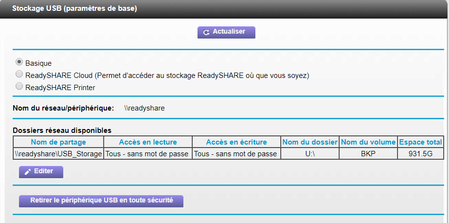

- Apr 16, 2018
I used your first sugestion/question and got to work. See the joined picture.
Thanks
Mchevrier1
Apr 09, 2018Aspirant
1. Are you able to access it when using the IP address (\\192.168.1.1)? See attached file
2. Was it working before? Yes, for years without any issues
3. Were you able to map it before? Yes, for years without any issues
4. Does FTP (local) access work? Yes
5. Have you tried using another storage device (flash drive, another external drive)? Yes, with no success. See attached file.
In File Explorer I see ReadyDLNA:WNDR4500
Through that I can see all the files, but when I go in FileHistory (MS Backup) to map the network Drive, WNDR4500 does not show. Before the problem occured, all I had to do was to map the network drive using File Explorer and point File History to that drive and my backups where done automatically.


DexterJB
Apr 12, 2018NETGEAR Moderator
Hi Mchevrier1,
If it is an option for you, you can try doing a factory reset on the router. If the issue persists, a firmware reflash then reset is something that you can try.
Regards,
Dexter
Community Team