NETGEAR is aware of a growing number of phone and online scams. To learn how to stay safe click here.
Forum Discussion

spialex75
Apr 13, 2019Aspirant
AC1750 R6700v2 disabled some features in Router mode
Hello all.
I have Netgear R6700v2.
In router mode, I did not access to some features (they are gray out):
Internet Setup,
Wan Setup,
Lan Setup,
and more... Netgear is in ROUTER mode. ...
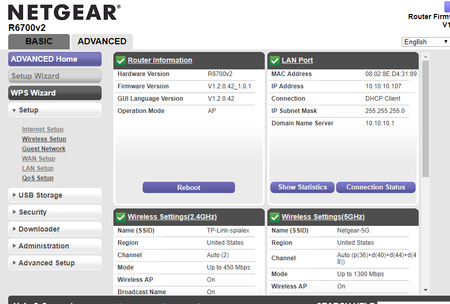
- Apr 17, 2019
I solved my problem.
Firmware version is 1.2.0.42_1.0.1
In front of router is modem TP-Link TL-WR740N (this modem was provided to me by ISP).
I called to ISP, and it told me to remove modem and to cable my Netgear directly to ISP. I did this, and now my R6700 works as router, and all settings are active.
Thanks.

michaelkenward
Apr 14, 2019Guru - Experienced User
What firmware version do you have on the device?
A number is more useful than "the latest". (It may not be by the time people read this.) There can also be newer versions, or "hot fixes", that do not show up if you check for new firmware in the browser interface.
It might help if you told people what the modem is in front of this router. The model number could be useful. Is it, by any chance, also a router, with a set of LAN ports on the back?
Embedded pictures have to be approved by a Netgear moderator before they appear here. Files attached to messages are available immediately.
spialex75
Apr 17, 2019Aspirant
I solved my problem.
Firmware version is 1.2.0.42_1.0.1
In front of router is modem TP-Link TL-WR740N (this modem was provided to me by ISP).
I called to ISP, and it told me to remove modem and to cable my Netgear directly to ISP. I did this, and now my R6700 works as router, and all settings are active.
Thanks.
- michaelkenwardApr 17, 2019Guru - Experienced User
spialex75 wrote:
In front of router is modem TP-Link TL-WR740N (this modem was provided to me by ISP).
That is why I asked you what the modem was in front of your R6700v2.
From what I can see, that is not a modem, just an old and slow router.
TL-WR740N | 150Mbps Wireless N Router (Discontinued) | TP-Link Australia
That would certainly explain why you had problems.
I guess there is some other box somewhere that delivers your Internet.
- spialex75Apr 17, 2019Aspirant
This is a equipment (TP-Link) that I've got from my ISP to browse internet... :smileysad:
- michaelkenwardApr 17, 2019Guru - Experienced User
spialex75 wrote:
This is a equipment (TP-Link) that I've got from my ISP to browse internet... :smileysad:
Sorry, I have no idea what that refers to.