NETGEAR is aware of a growing number of phone and online scams. To learn how to stay safe click here.
Forum Discussion

obxpav
Feb 09, 2020Aspirant
Blicking amber after PC is shut down.
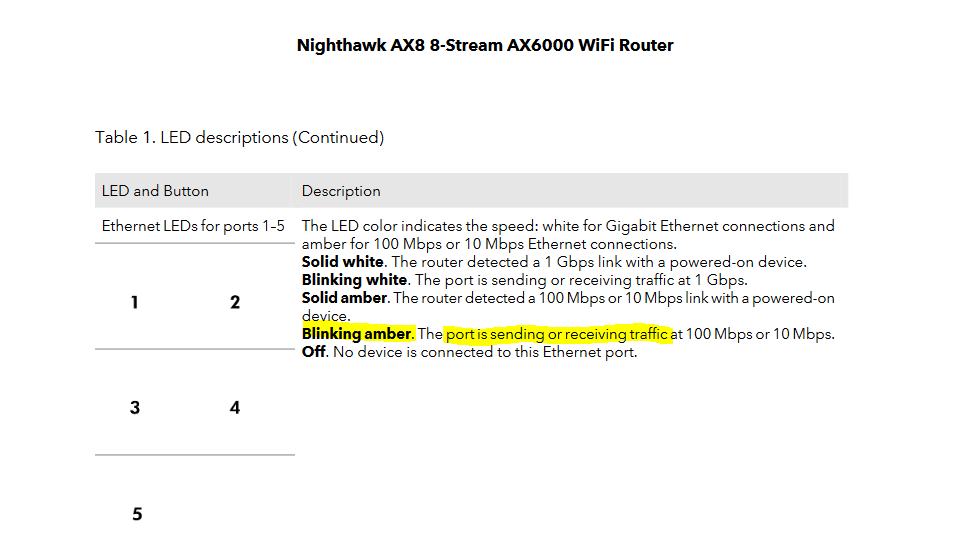
Hello! After shutting down Windows 10 laptop, the ethernet port is active. (blinking amber LED) . Question. Who or what is the laptop still "talking to"? I can this chatter be controlled? Tha...
- Feb 09, 2020Solved just as antinode prescribed. Wake-on-LAN was turned off and the port LED indicated no traffic.
My thanks to you as well EPAD for taking time to look at the question and offer options to consider.
To answer your questions. 1. Yes, the computer is wired and that is how the amber port light was illuminated. Since there are no SYNC/AKN lights on this model laptop, the amber LED on the router #3 port..The port that the laptop is jacked into, let me ID the active device.
Again,
My thanks you and antinode for taking the time to look at the question and offer options to begin working on a solution! Well done. -Paul
antinode
Feb 09, 2020Guru
> After shutting down Windows 10 laptop, the ethernet port is active.
> (blinking amber LED) .
Is that "blinking amber LED" on the (unspecified) "Windows 10 laptop"
or on the (unspecified) router?
Windows shut down, or asleep, or absolutely no power (battery and
AC), or what, exactly?
In many cases, a dormant-looking computer keeps its Ethernet
interface active in a stand-by (lower-power, lower-speed) mode, which
can cause the amber port-status LED on the router. This allows the
computer to respond to Wake-on-LAN requests. Typically, there's no
(other) activity in that situation.
> [...] Who or what is the laptop still "talking to"? [...]
Talking to or hearing. Could be some program which runs on the
(unspecified) "Windows 10 laptop". Could be some other device talking
to the (unspecified) "Windows 10 laptop". I'd try disconnecting devices
until it stops flashing. The alternative would be to hook up a network
anayzer, and look at the actual data, but that's a non-trivial
operation.
> [...] I can this chatter be controlled?
It'd be easier to decide that question after determining the cause.
obxpav
Feb 09, 2020Aspirant
Lenovo ideapad 330, running Windows 10 Home,: Normal Shut-down.
Blinking LED are of the RAX80 Router.
- EPADFeb 09, 2020Tutor
Is there a network cable plugged into the laptop or are you going wireless?
My first thought, you're seeing either the WAN ("internet") connection communicating with the router. This is completely normal.
If it's coming from the 1-5 ports (LAN), it might be a printer or Xbox or some other device plugged into the router. These devices often phone home when not in use to check for firmware/software update.
It could also be the wifi indicating your wifi is active. TV steaming, smart phone connectivity, etc.
If it is a network cable plugged into the laptop and plugged into the router, than it is most likely what antinode stated, Wake-on-LAN is enabled if you did select Shut Down from Windows start menu.
- obxpavFeb 09, 2020AspirantSolved just as antinode prescribed. Wake-on-LAN was turned off and the port LED indicated no traffic.
My thanks to you as well EPAD for taking time to look at the question and offer options to consider.
To answer your questions. 1. Yes, the computer is wired and that is how the amber port light was illuminated. Since there are no SYNC/AKN lights on this model laptop, the amber LED on the router #3 port..The port that the laptop is jacked into, let me ID the active device.
Again,
My thanks you and antinode for taking the time to look at the question and offer options to begin working on a solution! Well done. -Paul