NETGEAR is aware of a growing number of phone and online scams. To learn how to stay safe click here.
Forum Discussion

erik161
Apr 17, 2018Aspirant
Can't connect to the internet
I can connect to the internet on all devices (Phones and Laptop), but I can't conntect to the internet on both of my tablets (Samsung Tab2). It sais Connect, no internet. I tried to switch to anothe...
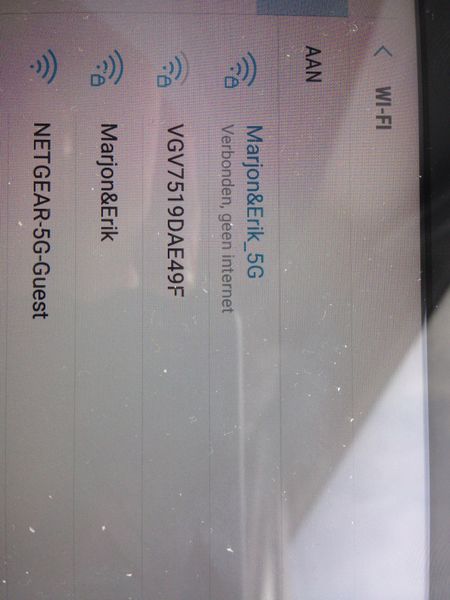
- Apr 23, 2018
erik161 wrote:I tried to change the IP adres to static, but I don't know which IP adres I should use. I'm a bit of a noob.
If a wireless deivce can't associate and establish the communication to a wireless access point (here on the router) it won't get a valid/workable network config - subsequently, everything else will fail. Trying to fix an IP address could proof - choose any unused one (see Attached Devices) - could proof. But serioulsy, I doubt this will help anything - and create more troubles when being on the road with the mobile/tablet/laptop.
erik161 wrote:
The firmware of my router is: V1.0.9.12
Netgear went through several iterations since to recover from various connectivity issues, check https://www.netgear.com/support/product/r7000.aspx for the current firmware download, as of writing it's 1.0.9.28.

schumaku
Apr 20, 2018Guru - Experienced User
Advanced -> Security -> Access Control configured in a way prohibiting the Internet access to some devices?
- erik161Apr 22, 2018Aspirant
Thnx for all the help, but I'm still having problem.
I tried to change the IP adres to static, but I don't know which IP adres I should use. I'm a bit of a noob.
The firmware of my router is: V1.0.9.12
I tried to find the security option in the netgear genie application, but I can't find it.
Does anyone know how to downgrade the firmware of the router. I think the problem started by upgrading it.
many thanks
- schumakuApr 23, 2018Guru - Experienced User
erik161 wrote:I tried to change the IP adres to static, but I don't know which IP adres I should use. I'm a bit of a noob.
If a wireless deivce can't associate and establish the communication to a wireless access point (here on the router) it won't get a valid/workable network config - subsequently, everything else will fail. Trying to fix an IP address could proof - choose any unused one (see Attached Devices) - could proof. But serioulsy, I doubt this will help anything - and create more troubles when being on the road with the mobile/tablet/laptop.
erik161 wrote:
The firmware of my router is: V1.0.9.12
Netgear went through several iterations since to recover from various connectivity issues, check https://www.netgear.com/support/product/r7000.aspx for the current firmware download, as of writing it's 1.0.9.28.
- erik161Apr 23, 2018Aspirant
The new firmware did the job. Thnx!!