NETGEAR is aware of a growing number of phone and online scams. To learn how to stay safe click here.
Forum Discussion

Ianski
Nov 08, 2022Aspirant
connecting expansion hard drive to R7000 - only seeing small partition
I have just purchased an expansion hard drive (Seagate, 8 TB) to replace a 4 TB drive that failed. When I plug this new drive directly into a Windows PC and use Computer Management, I can see that it...
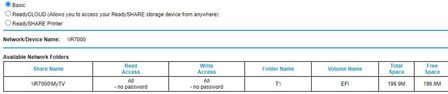
- Nov 08, 2022
I would try and hid the EFI partition on that drive from being seen or that drive needs a full on removal of that partition and re-partitioned so that no EFI partition is seen on that drive.

FURRYe38
Nov 08, 2022Guru - Experienced User
I would try and hid the EFI partition on that drive from being seen or that drive needs a full on removal of that partition and re-partitioned so that no EFI partition is seen on that drive.
Ianski
Nov 08, 2022Aspirant
You were bang on. Removing the EFI partition (using the Windows utility diskpart - in the command prompt - it cannot be done from the disk management panel) - and then formatting the entire drive as NTFS, did the trick. Works like a charm now. I was worried about the handful of files - about 40 MB worth - that Seagate provides with the drive, but I was able to copy those to a computer and save them just in case. I think they're just utilities that I would never use, anyways.
An unexpected bonus - after finishing that job, I took apart the "dead" 4 TB external drive that I was replacing. I removed the case, using a letter opener and a guitar pick. All they are inside is a standard internal SATA desktop hard drive, with an adapter board to support the special USB interface and the power supply. Remove that, and it's just a standard desktop drive. I have a set of cables that serve as a SATA to USB and power supply for internal drives (these are readily available at any computer repair shop). I hooked that up and connected the drive to a computer's USB port. The drive's just fine - all its data was intact. It seems it was the interface board only that had quit working. (it wasn't the power supply - I'd already tried swapping that out for a known good one.) Relieved, as some of the data on that drive wasn't backed up... it will be very soon!