NETGEAR is aware of a growing number of phone and online scams. To learn how to stay safe click here.
Forum Discussion

archos1
May 22, 2021Aspirant
DNS
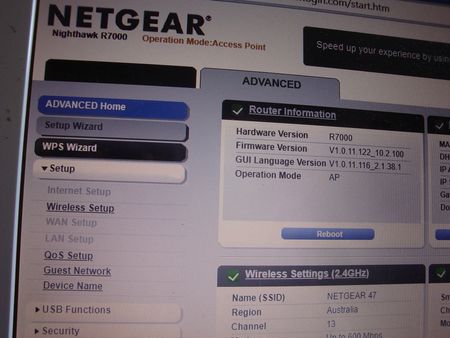
Recently I had to reset my NETGEAR R7000 to factory settings. Now after I did a basic setup I want to to change the DNS SETTINGS. I click on Advance then Setup but underneath where it says Inte...

michaelkenward
May 23, 2021Guru - Experienced User
You might find this useful if you want people to see your pictures clearly.
Copy the window or screen contents
Cameras just don't work on screens.
Then read this for an answer to your question:
Disabled Features on the Router when set to AP Mode | Answer | NETGEAR Support
- antinodeMay 23, 2021Guru
> Cameras just don't work on screens.
What, exactly, does "don't work" mean to you? I had no trouble
reading the salient information. Obviously.> Then read this for an answer to your question: [...]
Where does that KB article mention DNS?
- archos1May 23, 2021Aspirant
What does not work is this. A couple of years ago the Australian goverment forced all ISP (Internet service providers) in Australia to put a barring on their servers so people using apps like Kodi and the rest will not be able to access international video content.The solution at least for me was to get into my R7000 wi fi router and changed the DNS parameters so my wife could watch her favourite Greek TV series, thru Kodi,which is not an offence,since this content is available on the internet.But due to my recent reset of the router I have problem in accessing that option.
- archos1May 23, 2021Aspirant
I thought a picture is 1000 words.Rregardless thanks I will check your suggestion.
- michaelkenwardMay 24, 2021Guru - Experienced User
archos1 wrote:
I thought a picture is 1000 words.Rregardless thanks I will check your suggestion.
Absolutely, but it is quicker and easier to tell your PC to create that picture.
No need to aim a camera/phone at the screen, download the (usually a bit wonky) picture to a PC before uploading it to this place.
Use the built-in bit of Windows and you can miss out the "download to PC" step. You end up with an image that is easy to read and that you play around with to obscure sensitive details.
I mention it when people post photos because a lot of people don't realise that there is such a thing as Alt+Print Screen (or Shift+WinKey+S). That simple trick has many more uses than posting to places like this.
- archos1May 24, 2021Aspirant
Hi all, I wish to thank all that help me sort my issue in regard to the DNS settings in my R7000 router.I was all solved by taking the router out of Operation mode: Access mode.
Keep up the good work.I learned a lot out of all your contribution to my issue.