NETGEAR is aware of a growing number of phone and online scams. To learn how to stay safe click here.
Forum Discussion

Justme4161
Jul 28, 2021Aspirant
Firmware update failed, Ethernet port is not functional
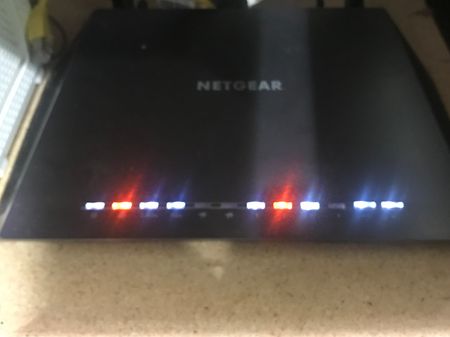
Last night I attempted to update the firmware on the router. There was a problem with the update. Now I cannot connect to the internet as the ethernet ports are not functioning. I can con...
- Jul 29, 2021
I completed a factory reset earlier today. When I did that there was no change to the LEDs. Also connecting something to those ports does not change the status of the LEDs. I have come to the conclusion, it is a HW issue.
antinode
Jul 28, 2021Guru
> [...] I attempted to update the firmware on the router. [...]
"attempted" how, exactly?
> [...] There was a problem with the update. [...]
Thanks for that detailed description.
> [...] Now I cannot connect to the internet [...]
What happens when you try?
A vague description of what does _not_ happen is less useful than a
clear description of what _does_ happen.
"cannot" is not a useful problem description. It does not say what
you did. It does not say what happened when you did it. As usual,
showing actual actions (commands) with their actual results (error
messages, LED indicators, ...) can be more helpful than vague
descriptions or interpretations.
> [...] as the ethernet ports are not functioning.
Says who? Evidence?
> IMG_2596.jpg
Three of the port-status LEDs in that picture look happy enough to
me. The Internet LED shows a problem, but not necessarily an Ethernet
port problem. To what is the router's WAN/Internet port connected? Is
that (unspecified) device happy?
> [...] I can connect to the router via wifi. [...]
So, _you_ can see the current firmware version? (With my weak
psychic powers, I can't.)
> [...] How do I manually update the firmware without using the ethernet
> ports.
Use a computer with a wireless connection? The procedure's the same.
An Ethernet connection is generally considered to be more reliable, but
if your "the ethernet ports are not functioning", then I might try to
use what was. Before I got too excited, I might try the basic stuff:
Visit http://netgear.com/support , put in your model number, and look
for Documentation. Get the User Manual (at least). Read. Look for the
LED descriptions and "Troubleshoot". Further reading might not hurt,
either.
Justme4161
Jul 28, 2021Aspirant
I attempted to update the firmware by using NetGenie and pressing the button which said to update the firmware. I'm not sure why the process failed, but I am not able to connect to the internet. I guess I should have mentioned, only port 1 is connected to the computer via ethernet. Lights 2 and 3 should be off as nothing is connected to those ports. I have the ethernet cable from the modem connected into the router.
Windows and NetGenie is reporting a connection between the computer and the router. However, they are stating there is no internet connection.
I have connected my computer directly to the modem and I am able to access the internet when I bypass the router.
As the firmware was updated last night and I've isolated the problem to the router, I believe the error is with the router.
The strange thing is that even though it appears I'm connected and port 1 is showing connected, Windows is stating there is no connection via Ethernet. However, I can connect with the router via wifi.
- antinodeJul 28, 2021Guru
> [...] I guess I should have mentioned, [...]
Yup.
> The strange thing [...]
Ok, I'm willing to admit that it's seriously confused.
> [...] Windows is stating there is no connection via Ethernet. [...]
Actual message? Is it complaining about the physical link ("Media
disconnected"), or only that the router's not acting as expected?
Without a good Ethernet physical link, you'd be in bigger trouble.Before getting too deep in the weeds, have you tried a settings
(misnomer: Factory) reset, and manual reconfiguration? Look for "reset"
in the User Manual.
I avoid the automatic update scheme, and always use the manual
method. Normally, I'd avoid doing anything critical over a wireless
connection, but a case like this might be an exception.In this case, I'd try doing a manual update from a computer with a
wireless connection.If that fails, then I'd fall back to the TFTP recovery scheme
mentioned above. See, for example:https://community.netgear.com/t5/x/x/m-p/1622096#M102004
However, although your router seems to be confused, it might not be
confused enough to know how confused it is, so it might not be as
receptive to the TFTP scheme as you might like. Some fiddling with
power-on and reset sequencing/timing might be needed.- Justme4161Jul 28, 2021Aspirant
As it stands now, I have been able to update the FW as indicated by logging in to the router. BTW, I had to use the IP address and not routerlogin.net because the router is not connected to the internet and can't access the site to be able to loop back.
Despite all this, my problem persists. I'm at a loss as to how to continue trouble shooting the issue. I'm also wondering if this morning's thunderstorms might have done something to the router. It is hooked up to a surgeprotector/UPS but it is possible something could have come in through the coax and ethernet lines. In case you are wondering, I actually did swap out my ethernet cable... just in case....
- michaelkenwardJul 29, 2021Guru - Experienced User
Justme4161 wrote:
As it stands now, I have been able to update the FW as indicated by logging in to the router. BTW, I had to use the IP address and not routerlogin.net because the router is not connected to the internet and can't access the site to be able to loop back.
There is no connection to the Internet and site to "loop back" from.
routerlogin.net is a local link to the router.It should work even when you don't have the router connected to the outside world. After all, it is supposed to work during the setup stage when there is no Internet connection. You can even do it off line.
If it doesn't connect, then there maybe something else going on.
Justme4161 wrote:
I'm also wondering if this morning's thunderstorms might have done something to the router.
Thunderstorms are excellent killers of electronic kit.
It may be some time before the images land. To ensure that you aren't posting anything naughty, a Netgear moderator has to approve the pictures.
You can attach images to messages without any delay.

