NETGEAR is aware of a growing number of phone and online scams. To learn how to stay safe click here.
Forum Discussion

Sid-R8500
Aug 27, 2017Tutor
Help with OpenDNS setup for Nighthawk X8 R8500
Hi Gurus I need some help with setting up my new router wirh OpenDNS (for parental controls). I wanted to use the easiest way using this post (this is how I set it up for my older router): https:...
 Aug 31, 2017After disabling AP mode on the R8500, it usually necessary to force all of your devices to obtain new IP addresses. If you don't know how to do that, then rebooting them will work.
If you log into the R8500, does it say that the Internet connection is up?
Sid-R8500
Aug 28, 2017Tutor
Thank you so much for your response. I think that's the problem.
How do I change the operation mode of the R8500? This is my main (and only) router so I must have confgured it to run in AP mode incorrectly. What do I do now?
Please advise!
Thank you!
TheEther
Aug 28, 2017Guru
Go to ADVANCED > Advanced Setup > Wireless AP. Uncheck the Enable AP Mode box and click Apply.
But if this is your only router, how have you been accessing the Internet with multiple devices?
But if this is your only router, how have you been accessing the Internet with multiple devices?
- Sid-R8500Aug 29, 2017Tutor
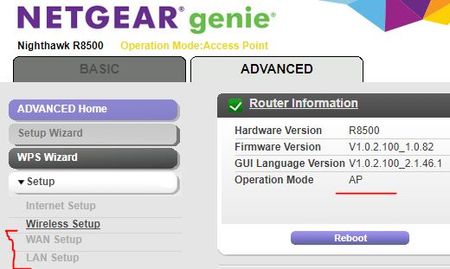
Sorry but I do not see any such option - see the screenshot below:
And you have asked a good question but don't know the answer. Maybe above screenshots gives you idea. I configured three networks on the above screen. Two with 5Hz and one wth 2.4Hz. My devices connect to one of them whichever they are able to see. My new laptop connects to the 5Hz one and the older ones to the 2.4Hz one.
Please advise how can I reconfigure my router to not run in "AP" mode but a "Router" mode so that I may configure OpenDNS.
As you can see in the screenshot above, many options are disabled (perhas because it is running in AP mode).
Thank you so much for your time.
- Sid-R8500Aug 29, 2017Tutor
my apologies... I finally found it. But when I unchecked the "AP" option, the router rebooted and then all devices started to fail accessing internet even though they showed connected. Why is that?
Also, when I disabled the "AP" mode, there was a message that may need to assign IP addresses to my device manually. Why is that?
Please advise!
- Sid-R8500Aug 29, 2017Tutor
also with the AP mode disabled, I can only access the router via "http://192.168.1.1" and not the "http://routerlogin.net/start.htm" url and vice versa. I am too confused.
please advise.
- TheEtherAug 30, 2017GuruWho is your ISP and what is the model of the modem?
Is the R8500's yellow, Internet port connected to the modem?