NETGEAR is aware of a growing number of phone and online scams. To learn how to stay safe click here.
Forum Discussion

Sid-R8500
Aug 27, 2017Tutor
Help with OpenDNS setup for Nighthawk X8 R8500
Hi Gurus I need some help with setting up my new router wirh OpenDNS (for parental controls). I wanted to use the easiest way using this post (this is how I set it up for my older router): https:...
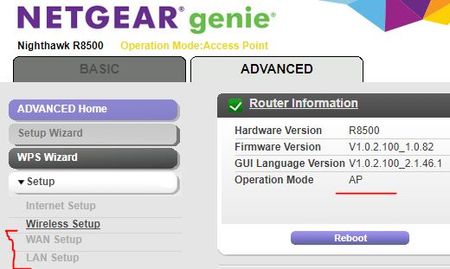
 Aug 31, 2017After disabling AP mode on the R8500, it usually necessary to force all of your devices to obtain new IP addresses. If you don't know how to do that, then rebooting them will work.
If you log into the R8500, does it say that the Internet connection is up?
Sid-R8500
Aug 30, 2017Tutor
Thank you for your response.
ISP is TekSavvy and Modem is "hitron" - see below:
The Router is connected to LAN port of the VOIP gateway which is then connected to the Yellow port on the Modem - as showsn below:
This how the tech support from ISP asked me to connect.
Please advise if this is wrong.
Thanks again!
TheEther
Aug 31, 2017Guru
After disabling AP mode on the R8500, it usually necessary to force all of your devices to obtain new IP addresses. If you don't know how to do that, then rebooting them will work.
If you log into the R8500, does it say that the Internet connection is up?
If you log into the R8500, does it say that the Internet connection is up?
- Sid-R8500Aug 31, 2017Tutor
OK so I guess the way my modem-gateway-router are connected is not a problem - right?
'll try disablng the AP mode again and reboot all devices and see how it goes. And yes, after I disabled the AP mode last time and the router rebooted automatically, it said Internet connecton was up.
Thank you so much for your help - I'll try that and provide you update.
- Sid-R8500Sep 02, 2017Tutor
Hi there
disabled the AP mode, and all devices connecti fine. OpenDNS config is also effective.
Thank you so much for all your time and help - much appreciated!!