NETGEAR is aware of a growing number of phone and online scams. To learn how to stay safe click here.
Forum Discussion

ardy_chen
May 04, 2022Aspirant
How can I change the WAN port of my x6 R8000 to 1000M from 100M?
I bought R8000 several years ago when I was using a 100M network. Now, I have upgraded the network service to 1000M. I am getting no more than 100M speed in the Speed Test. I entered the router admin...
ardy_chen
May 04, 2022Aspirant
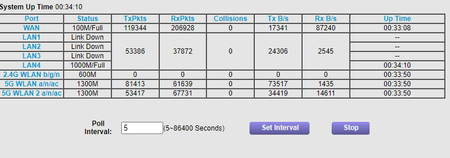
Got a result for your recommendation of "quick test", it is 100M. Does it mean the WAN port of the router only supports the connection at 100M?

FURRYe38
May 04, 2022Guru - Experienced User
No, sounds like the WAN port is faulty or stuck in a bad state.
Try this, unplug everything from the router while ON. Press the reset button for 10 seconds then release. When you see the Internet LED turn OFF, unplug the power plug from the router for 30 seconds, Press the power button so it's in the OFF position then plug the power back in then power up. Leave all unplugged. When the power LED is white, plug in the PC ethernet adapter again, check for 100Mb or 1Gb...if it's still 100Mb, then the WAN port is bad.