NETGEAR is aware of a growing number of phone and online scams. To learn how to stay safe click here.
Forum Discussion

Nicolus008
Dec 23, 2021Aspirant
How to separate RBR40 2.4GHz and 5GHz
I cannot to install Alro pro 4 cam, because it is use the 2.4 GHz. I have two question. How To disable the 5GHz, because there do not have the checkbox to click the disable the 5GHz. How to cra...

plemans
Dec 23, 2021Guru - Experienced User
You shouldn't need to disable the 5ghz or seperate them out.
Did you contact Arlo for support with connecting their camera?
Nicolus008
Dec 23, 2021Aspirant
Hi Plemans,
Thank you for your replied, I sent the message to arlo for setting isses.
But RBR40 can separte and I can choice use 2.4GHz or 5GHz?
I know other brand router can setting it.
- plemansDec 24, 2021Guru - Experienced User
No. the orbi series you can't seperate the bands.
- Nicolus008Dec 24, 2021Aspirant
So I need to buy other brand router, right?
- FURRYe38Dec 24, 2021Guru - Experienced User
Netgear provides a simple mechanism to accomplish this. Turn OFF all RBS. The Orbi RBR has a feature which many users have found allows them to set up devices which require the smartphone to be attached to WiFi at 2.4G:
Connect a device with a large screen to the Orbi web interface, http://orbilogin.net
(computer, laptop, tablet)
The user name is "admin" and the password is the web interface password, not the Orbi 'app' password.
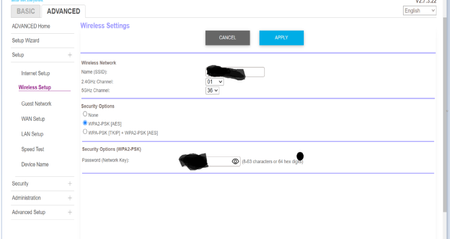
Navigate to the Advanced Tab, Advanced Settings (at the bottom), Wireless Settings.
On the Advanced Wireless Settings page, uncheck the box under Advanced 5G Settings that reads
Enable SSID Broadcast
Click Apply
The router will go through a cycle which takes foreeeeeeeever.
On the smart phone, go into Network settings.
"Forget" the Orbi WiFi.
Search for available WiFi systems.
Select the Orbi WiFi
Enter the password and Connect
The smartphone is now connected to the Orbi at 2.4G
Note that if you attempt to "double check" by opening the Orbi Attached Devices page, that page takes several minutes to update.
Just go with it.
Open the device smartphone app and go through the setup process.
After the device is connected and working, undo the process.
On the web interface, check the box and click Apply
On the smartphone, Forget the Orbi, find it again, and connect again.
This takes less time to do than to read. It has worked for me several times.Be aware that there seems to be a time limit with some iOS or Android devices that will connect to the 2.4Ghz radio for a short period of time before changing automatically to the 5Ghz SSID, even though it's been hidden. The SSID is hidden only, thus the signal is still present. So you might want to also change the power output of the 5Ghz radio to 25%. Then connect your mobile device at a distance from the RBR to ensure the mobile phone keeps connected to the 2.4Ghz radio. After you get the IoT device connected, re-configure the system back to where it was.
Netgear has set up a community forum specifically for the Orbi AC products. Most of the people who watch that forum are more likely to have experience with Orbi and know how to work it better than those of us who follow this router forum. Might be more likely to find someone who has a solution if the question is posted there:
https://community.netgear.com/t5/Orbi/bd-p/Orbi
Please use this link to the main forum product list to review and choose where to make your posts.
https://community.netgear.com/t5/NETGEAR-Forum/ct-p/en-netgear
Thank you.
