NETGEAR is aware of a growing number of phone and online scams. To learn how to stay safe click here.
Forum Discussion

Wheeler1080
Mar 28, 2021Aspirant
Minecraft Server XR500
I am trying to run a Minecrafte server from my desktop PC connected Hardwired from the XR500 tot he PC. I have followed every video on youtube about setting one up. I can get into it locally but when...
antinode
Mar 28, 2021Guru
> [...] I have followed every video on youtube about setting one up.
> [...]
Sincere thanks for not including the links.
> First I did CMD and ipconfig to get my local IP address [...]
Where "my" means "my server's"? Did you also fix that address using
ADVANCED > Setup > LAN Setup : Address Reservation, so that your server
wouldn't wander away from your port-forwarding rule?
> [...] I did fone one pages [...]
Thanks for the helpful link. (Less sincere, this time.)
> suggested I make a static IP by going into my control panel, [...]
I'd suggest using (dynamic) Address Reservation, instead of
configuring your server with a static address. Careless use of static
addresses can cause more problems than it solves.
> [...] whatsmyipaddress.com and got my local IP# [...]
And got what, exactly? If you're worried about revealing secrets,
then the top half of the address, "a.b" out of "a.b.c.d", would satisfy
most of my curiosity.
What's the IP address of the router's WAN/Internet interface?
ADVANCED > ADVANCED Home : Internet Port : Internet IP Address
For the usual problems with port forwarding, see:
Wheeler1080
Mar 28, 2021Aspirant
ok forgive me if this is a double post as I replied and it doesnt seem to have saved.
There was many youtube videos I used to set up the server and many of them were all really the same steps, however the one I used the most is this one "https://youtu.be/bljisWyxU-8
I do have the server address (local) as set up from the static IP (which I will remove as you mentioned that it causes more problems then it solves) which is also the same one in the list when I set the port forwarding.
as far as my local IP it was 98.5.1**.***
And for your last Q "What's the IP address of the router's WAN/Internet interface? ADVANCED > ADVANCED Home : Internet Port : Internet IP Address" :
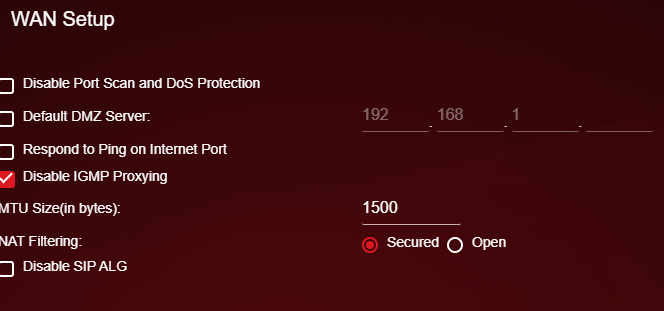
I do not have that path to provide you the answer to your question. The only thing with WAN I can find in all my settings and options is under SETTINGS>SETUP>WAN SETUP and it looks like this:
I thank you for lending me assistance in my issues, and I appolgise for not including enough information, I am not 100% how much detail I need to provide.
- antinodeMar 28, 2021Guru
> I do not have that path to provide you the answer to your question.
> [...]Sorry. I was thinking of a non-Pro-Gaming model, which is organized
differently. Does Settings> Setup > Internet Setup show the router's
WAN/Internet IP address? Settings > Setup > WAN Setup is too much
fine-print. (And, of course, Netgear no longer includes useful screen
shots in its manuals.)- Wheeler1080Mar 29, 2021Aspirant
Sorry again, I attempted to attach a screen shot to my last post of that page, but it seems it it just a broken image. when I go into the WAN setup the only thing with an IP is something called "Default DMZ Server:" and in there is only lists SOME of my local IP, and doesnt list the last 2 number of the local IP. I assume I need to check that box and add the missing number in manually?
So I checked the box and put in the local IP address 192168.1.14 as its showing now after removing the static IP as suggested. I did put in the local IP (as it is now listed in the router page and changed the IP on the minecraft server config file) in the Address Reservation section as well. I then went to yougetsignal.com and tried my local IP address for port 25565 (what minecraft needs) and it still says the port is closed. I am not sure what else I am missing.
- antinodeMar 29, 2021Guru
> [...] "Default DMZ Server:" [...]
That effectively creates a port-forwarding rule for _all_ ports. It
won't help if a proper selective port-forwarding rule fails.> [...] I am not sure what else I am missing.
You haven't revealed the requested information about your router:
> What's the IP address of the router's WAN/Internet interface?
> [...] Does Settings> Setup > Internet Setup show the router's
> WAN/Internet IP address? [...]The User Manual's uninformative, and I don't have an XR500 in hand,
so I can't tell you where to find that datum.You don't seem to have answered any of the questions, or performed
any of the suggested tests in:
> https://community.netgear.com/t5/x/x/m-p/1859106So far, we're still at number 1, and, without the router's
WAN/Internet IP address, I don't expect any progress.