NETGEAR is aware of a growing number of phone and online scams. To learn how to stay safe click here.
Forum Discussion

Adilost
Jul 20, 2018Aspirant
Need Some Help Please..
Dear NetGear Community,
Last week I bought the NightHawk X6 AC3200 Router as an addition to boost my Home Network's WiFi performance .
Installation was pretty easy, just downloaded the Ni...
- Jul 21, 2018The Netgear router must be able to pickup a public IP address on the Internet/WAN port - commonu on cable TV by DCHP. Cold reboot the Ziggo-Bix, let it reconfigure from the ISP network, then bring the Netgear router up. There must be more disabled than just the DHCP server on the Ziggo btw.

schumaku
Jul 20, 2018Guru - Experienced User
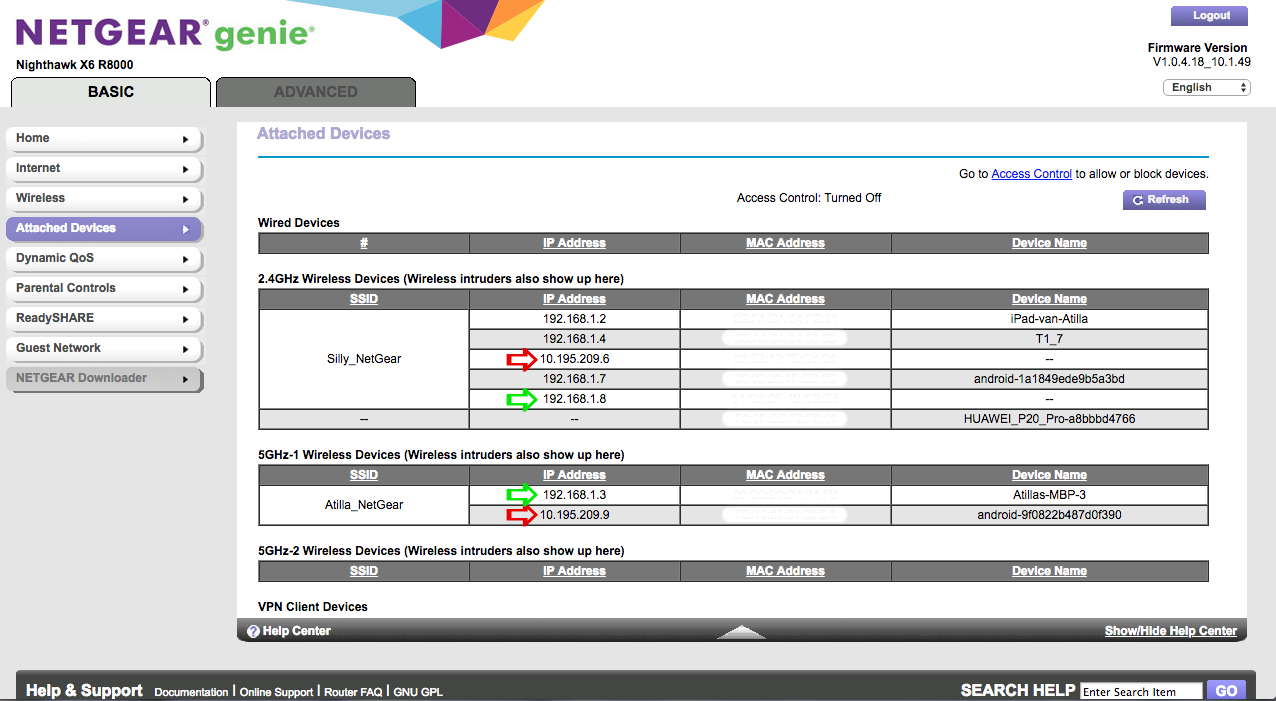
Is the Zigo box acting as a pure router, or is it configured to work as a fully blown NAT router, and issuing 10.x.x.x or 10.195.209.x LAN IPs to direct connected devices? What is the Netgear router WAN/Internet address?
Adilost
Jul 20, 2018Aspirant
First let me thank you for your quick reply, I really appreciate it..
I myself am not to technical. But I think the Ziggo Box is acting as a pure modem/router. I've looked in the configuration/settings but could not find anything regarding NAT settings or what so ever.
Regarding the "10.x.x.x or 10.195.209.x LAN IPs" question. I am affraid I dont understand your question correctly.. Do you mean if they are connected via Ethernet Cable? If that's your question, no they are not. Everything is pure wireless..
When it comes to my NetGear router information, I think pictures saying more then words (since I'm not that technical), so therefor I've attached* a few screenshots regarding the NetGear configuration/settings.
*
https://ibb.co/cvhd6y
https://ibb.co/mu3kmy
https://ibb.co/nLTwtd
https://ibb.co/mx8wtd
https://ibb.co/ik09Dd
Please let me know what you think..
- schumakuJul 20, 2018Guru - Experienced User
Based on some short reading the Ziggo Connectbox does default to be Modem and Router, so including NAT et all - a dedicated router is not required.Ziggo Connectbox says:
"Bij een internetabonnement van Ziggo krijg je altijd een wifi-modem. Dat is een modem en router in één. Een wifi-modem is geschikt voor bedraad en draadloos internet. Hierdoor is een aparte router niet nodig."
Have discovered an option (items listed to the right side "Bridge-modus anzetten") to re-configure the Ziggo Box to bridge mode so it behaves like a pure Modem - Bridge-modus inschakelen Heb je een super-de-luxe router gekocht die je wilt gebruiken in plaats van de router in het wifi-modem van Ziggo? Dan kun je ons modem in bridge-modus zetten. Dat heeft voor- en nadelen. Hier zie je wat de mogelijkheden zijn voor jouw modem.
For the Ziggo Connectbox you can contact thier support and request the reconfiguration to a pure bridged modem (if my Swiss-German Dutch reading is correct).
"We kunnen dit modem alleen op afstand in bridge-modus zetten. Neem contact op met de Klantenservice. Dan helpen we je verder."Still unclear from where these 10.x IP addresses were coming from - I had the assumption these were addresses "leaked" over the Netgear router from the Ziggo DHCP - however that one seems to be on 192.161.178.0/24 network.
Hope this does help for the moment.
Regards,
-Kurt
- AdilostJul 21, 2018Aspirant
Thanks again for your expertise schumaku..
I've called the customer service, they have put the connect box in bridge mode, let's see if this changes things..
Keep you updated :)
- AdilostJul 21, 2018AspirantOke, so after the customer service has turned on the bridge mode on the connect box (Basicly they turned of the DHCPv4 option), I powered off the NetGear router, unplugged it from the power cable. After that did the same with the connect box.
After 5 minutes or so I plugged back the cable in the connect box, powered it back on. After that did the same with the NighHawk X6 (plugged the ethernet cable in port 1 of the connect box).
I should have internet via the NightHawk router right?
My devices connect to it via WiFi, but no internet..
The "Internet" LED on top of the NightHawk is orange instead of white now.
Also when i log in to the NetGear router, i see this:
https://pictr.com/image/21p7Q
https://pictr.com/image/21l8V
Also, Information that was before on the Internet IP Address page is also gone..
https://pictr.com/image/21Sav
Am i missing something?- schumakuJul 21, 2018Guru - Experienced UserThe Netgear router must be able to pickup a public IP address on the Internet/WAN port - commonu on cable TV by DCHP. Cold reboot the Ziggo-Bix, let it reconfigure from the ISP network, then bring the Netgear router up. There must be more disabled than just the DHCP server on the Ziggo btw.